


Quick Start
Prerequisites
Before installing and using the Polyv Interactive Classroom Java SDK, ensure that the B-end has the following environment:
Java environment installed.
The Polyv Interactive Classroom Java SDK supports version 1.8 or higher.
Register a Polyv account and obtain access key information (UserId, AppId, AppSecret).
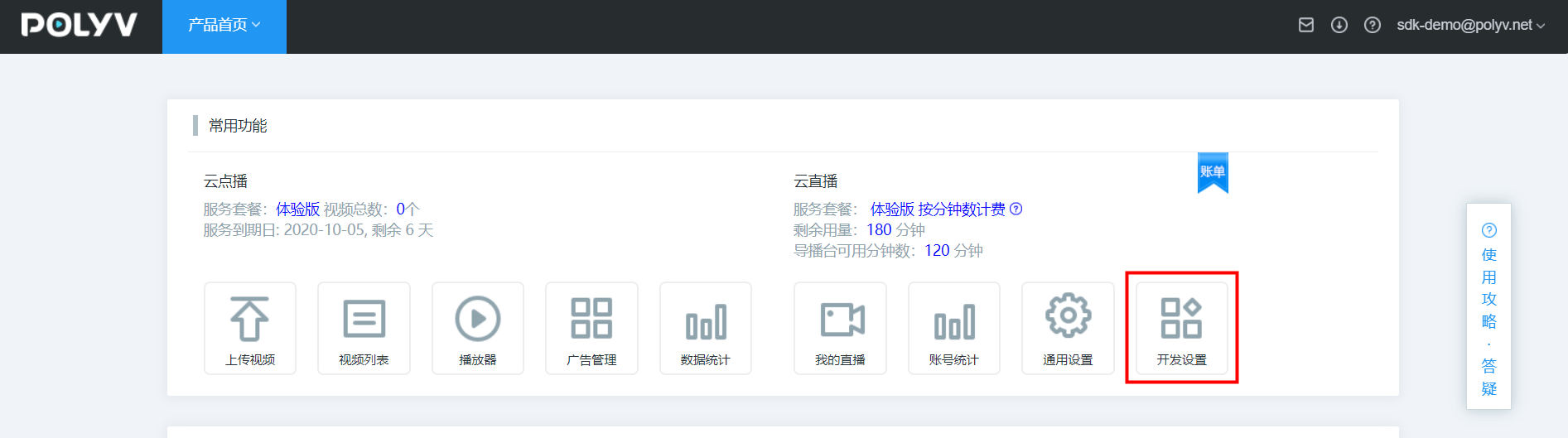
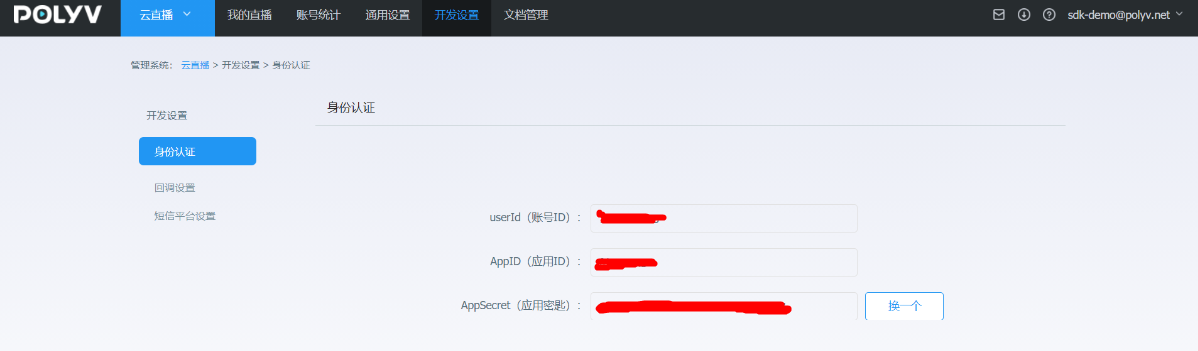
1. Add Maven Dependency
Add the following dependency to the project's POM file:
Note: Due to network restrictions of the Maven Central Repository, the Alibaba Cloud Maven central proxy repository may fail to find dependencies. It is recommended to use the central repository: https://repo1.maven.org/maven2/
<dependency>
  <groupId>net.polyv</groupId>
  <artifactId>polyv-java-vclass-sdk</artifactId>
  <version>2.2.8</version>
</dependency>
Note: To eliminate verbose Java code, the SDK uses the latest feature of JDK 1.8, Lombok. Please configure Lombok support in IntelliJ or Eclipse.
<dependency>
    <groupId>org.projectlombok</groupId>
    <artifactId>lombok</artifactId>
    <version>1.18.10</version>
</dependency>
2. Initialize the System
Before executing test code, the B-end needs to initialize the system configuration, including UserId, AppId, and AppSecret. If you do not have this information, refer to the Prerequisites section. Example initialization code is as follows (choose one):
   /**
     * 初始化配置,请配置自己的账号信息
     */
    public static void initPolyvLive(){
        String userId = "xxx";
        String appId = "xxx";
        String appSecret = "xxx";
        VClassGlobalConfig.init(appId, userId, appSecret);
        log.debug("--初始化完成--");
    }
     /**
     * 初始化配置并初始化 HTTP CLIENT 连接池超时时间和最大连接数配置,请配置自己的账号信息
     */
    public static void initPolyvLive(){
        String userId = "xxx";
        String appId = "xxx";
        String appSecret = "xxx";
        Integer timeOut = 20000;  //HTTP CLIENT 连接池超时时间
        Integer maxClientNum = 100;  //HTTP CLIENT 最大连接数
        VClassGlobalConfig.init(  appId,  userId,  appSecret,  timeOut ,  maxClientNum);
        log.debug("--初始化完成--");
    }
The above code is typically configured in a global initialization that runs once when the system starts. If using the Spring framework, refer to the following:
package net.polyv.live.config;

import org.springframework.beans.BeansException;
import org.springframework.context.ApplicationContext;
import org.springframework.context.ApplicationContextAware;
import org.springframework.stereotype.Component;

import lombok.extern.slf4j.Slf4j;

/**
 * 默认启动配置类
 * @author: thomas
 **/
@Slf4j
@Component
public class StartupListener implements ApplicationContextAware {

    @Override
    public void setApplicationContext(ApplicationContext applicationContext) throws BeansException {
        String userId = "xxx";
        String appId = "xxx";
        String appSecret = "xxx";
        VClassGlobalConfig.init(appId,userId,appSecret);
        log.debug("--初始化完成--");
    }


}
3. Execute Test Code
Test creating a course session. The unit test code is as follows:
import java.text.SimpleDateFormat;

import org.junit.Assert;

import com.alibaba.fastjson.JSON;

import lombok.extern.slf4j.Slf4j;
import net.polyv.common.v1.exception.PloyvSdkException;
import net.polyv.vclass.v1.config.VClassGlobalConfig;
import net.polyv.vclass.v1.constant.VClassConstant;
import net.polyv.vclass.v1.entity.lesson.VClassAddLessonRequest;
import net.polyv.vclass.v1.entity.lesson.VClassAddLessonResponse;
import net.polyv.vclass.v1.service.lesson.impl.VClassLessonServiceImpl;

@Slf4j
public class VClassLessonDemo {

  /**
   * 调用demo,必须处理PloyvSdkException。
   * <p>
   * 参数合法性校验:SDK采用自定义验证框架对输入参数进行校验,如有参数不合格,将抛出PloyvSdkException异常,exception的message
   * 包括具体校验不通过的字段信息,此异常是运行时异常,必须捕获处理相关业务逻辑;
   * <p>
   * 解析返回数据:解析返回数据,如SDK调用正常成功,将封装响应对象,正常返回,如服务器返回错误信息,SDK将将抛出PloyvSdkException异常,exception的message
   * 包括具体服务器执行错误信息,此异常是运行时异常,必须捕获处理相关业务逻辑;
   * @param args
   */
  public static void main(String[] args) {
    //全局初始化,此处应该全局执行一次
    String userId = "xxx";
    String appId = "xxx";
    String appSecret = "xxx";
    VClassGlobalConfig.init(appId, userId, appSecret);
    log.debug("--初始化完成--");
    try {
      //封装API请求对象
      VClassAddLessonRequest vClassAddLessonRequest = VClassAddLessonRequest.builder()
              .name("测试创建互动学堂课节")
              .startTime(new SimpleDateFormat("yyyy-MM-dd HH:mm:ss").parse("2022-02-28 16:00:00"))
              .duration(30)
              .linkNumber(5)
              .watchCondition(VClassConstant.AuthType.NULL.getCode())
              .build();
      //调用SDK请求保利威服务器
      VClassAddLessonResponse vClassAddLessonResponse = new VClassLessonServiceImpl().addLesson(
              vClassAddLessonRequest);
      Assert.assertNotNull(vClassAddLessonResponse);
      //正常返回做B端正常的业务逻辑
      if (vClassAddLessonResponse != null) {
        //to do something ......
        log.debug("课节创建成功 {}", JSON.toJSONString(vClassAddLessonResponse));
        log.debug(
                "老师上课地址:https://s.vclass.com/live-web-hi-class/teacher/login?lessonId={}, 老师登录账号:{}, 老师登录密码:{}",
                vClassAddLessonResponse.getLessonId(), vClassAddLessonResponse.getTeacherMobile(),
                vClassAddLessonResponse.getTeacherPasswd());
        log.debug("学生上课地址:https://s.vclass.com/live-web-hi-class/student/login?lessonId={}",
                vClassAddLessonResponse.getLessonId());
      }
    } catch (PloyvSdkException e) {
      //参数校验不合格 或者 请求服务器端500错误,错误信息见PloyvSdkException.getMessage()
      log.error(e.getMessage(), e);
      // 异常返回做B端异常的业务逻辑,记录log 或者 上报到ETL 或者回滚事务
    } catch (Exception e) {
      log.error("SDK调用异常", e);
    }
  }
}
After executing the code, the console should output the following key information, indicating successful integration:
[main] DEBUG net.polyv.common.v1.base.HttpUtil - http 请求 url: https://api.polyv.net/hi-class-api/open/lesson/v1/add?requestId=61b9ac58d3114c2683fd4c5342040c43&appId=frlr1zazn3&sign=3DF2B54E330650B4A75F5E157606EC99×tamp=1644999444305 , 请求参数: {"appId":"frlr1zazn3","duration":30,"linkNumber":5,"name":"测试创建互动学堂课节","requestId":"61b9ac58d3114c2683fd4c5342040c43","sign":"3DF2B54E330650B4A75F5E157606EC99","startTime":1646035200000,"timestamp":"1644999444305","watchCondition":"NULL"}
[main] DEBUG net.polyv.common.v1.base.HttpUtil - http 请求结果: {"code":200,"status":"success","requestId":"58d56000408d4b9792ac93d1412020a1.91.16449994455159077","data":{"lessonId":15551,"lessonCode":"srs04332","name":"测试创建互动学堂课节","status":0,"startTime":1646035200000,"endTime":1646037000000,"duration":30,"watchCondition":"NULL","secretKey":"wpo5tyus97","cover":"//s1.videocc.net/default-img/small-class/default-cover.png","teacherId":"g73qb9mfz5","teacherName":"张老师","courseCount":0,"webStartUrl":"https://s.vclass.com/live-web-hi-class/teacher/login?lessonId=15551","watchStartUrl":"https://s.vclass.com/live-web-hi-class/student/login?lessonId=15551","aloneWatch":"Y","cataId":0,"teacherCode":"+86","teacherMobile":"12000002368","teacherPasswd":"pV6VW7","linkNumber":5,"autoConnectMicroEnabled":"N","autoRecordCourseEnabled":"N","autoAllVisible":"Y","resolution":0,"playResolution":360},"success":true}
[main] DEBUG cn.timelost.spring.VClassLessonDemo - 课节创建成功 {"autoConnectMicroEnabled":"N","autoRecordCourseEnabled":"N","cover":"//s1.videocc.net/default-img/small-class/default-cover.png","duration":30,"endTime":1646037000000,"lessonId":15551,"linkNumber":5,"name":"测试创建互动学堂课节","playResolution":360,"resolution":0,"secretKey":"wpo5tyus97","startTime":1646035200000,"teacherCode":"+86","teacherId":"g73qb9mfz5","teacherMobile":"12000002368","teacherName":"张老师","teacherPasswd":"pV6VW7","watchCondition":"NULL"}
You can also log in to the official website to verify whether the creation was successful.
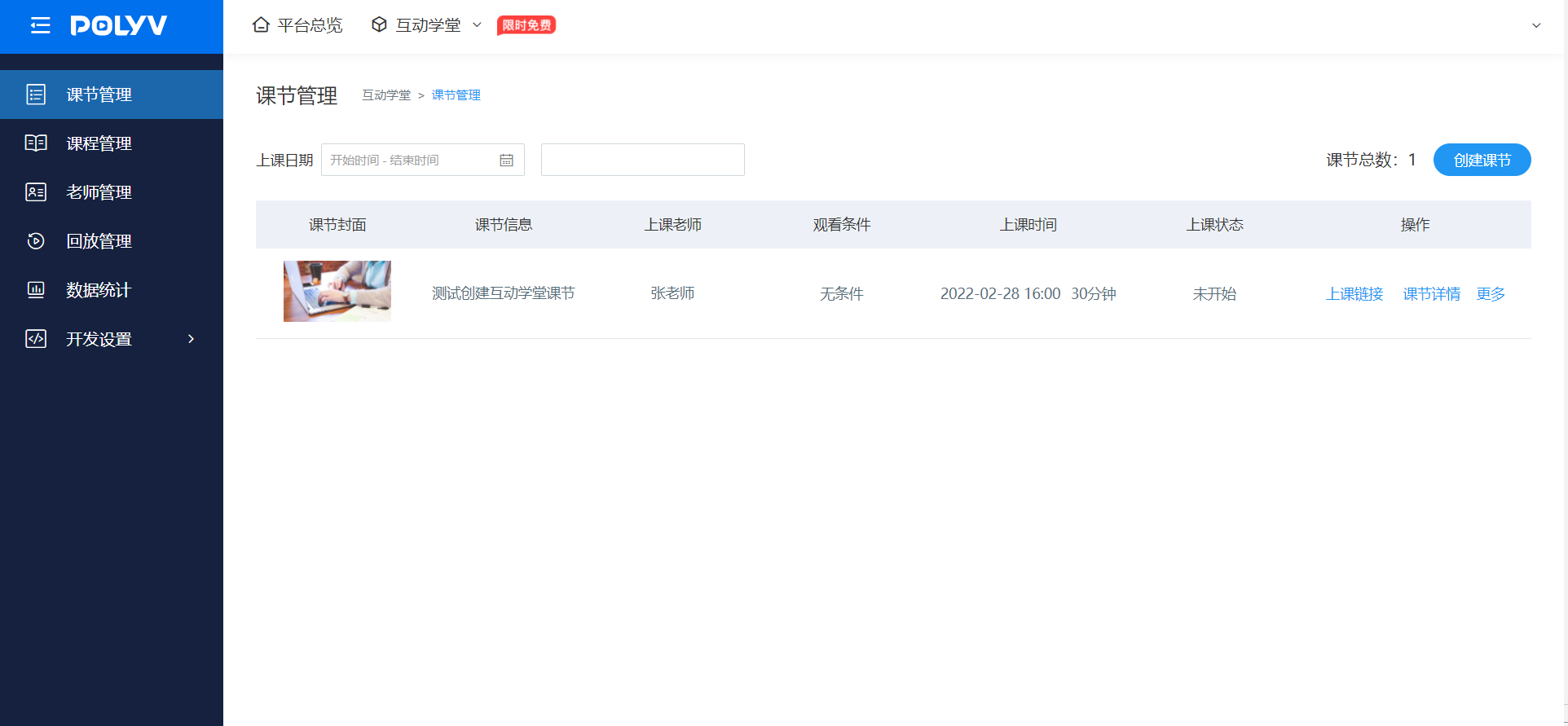
At this point, the B-end has completed the installation and configuration of the Polyv Interactive Classroom Java SDK and can use the Interactive Classroom SDK for further development and testing. If you encounter any issues during the B-end integration process, use the Online Customer Service button in the lower right corner to contact after-sales technical support. Please provide the runtime environment, operation steps, error feedback, and contact information to facilitate quick problem identification and resolution.
