Introduction
1. Basic Description
Polyv Live Streaming originates from the company's years of video technology accumulation. Based on professional cross-platform video codec technology and large-scale video content distribution networks, it provides stable, smooth, low-latency, and high-concurrency real-time audio and video services.
Polyv Interactive Classroom Java SDK allows you to easily access Polyv Live Video Cloud services without complex programming, enabling cloud live streaming and related video services.
Polyv Interactive Classroom Java SDK is built on and wraps the Polyv Interactive Classroom API, optimizing it. It abstracts common tasks for B-end users. The API call logic and exception handling are encapsulated and optimized. B-end users only need to encapsulate request parameters and hand them over to the Polyv Interactive Classroom Java SDK for processing. After processing, the SDK returns results, and the B-end continues its business logic based on the returned data. Currently, the Polyv Interactive Classroom Java SDK covers most frequently used API operations, including channel management, viewing management, live interaction, chat rooms, and players.
If you encounter any issues while using the Polyv Interactive Classroom Java SDK, please contact online customer service to ask post-sales technical support. Please provide the runtime environment, operation steps, error feedback information, and contact details simultaneously to facilitate quick problem identification and resolution.
2. Overall SDK Design
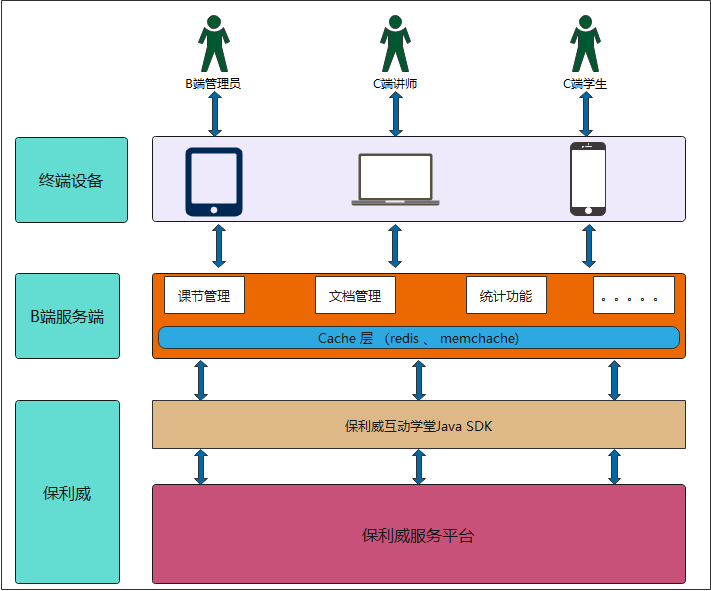
The B-end administrator creates basic course session information via the SDK, such as course session name, start time, and other basic attributes.
The B-end administrator configures basic course session settings via the SDK, such as viewing conditions, class duration, instructor, and the number of participants allowed for co-streaming.
The C-end instructor logs into the course session via a web page to start the class.
The C-end student enters via the class link to start listening.
After the course ends, the B-end retrieves playback, statistical analysis data, and completes the Interactive Classroom business loop.

3. Detailed SDK Design
4. SDK Business Logic Analysis
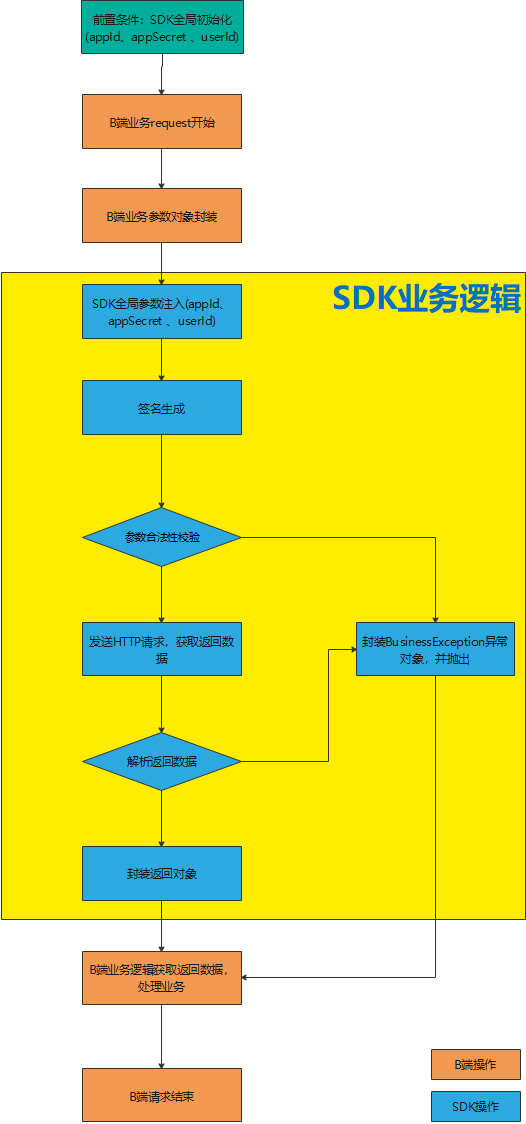
* Prerequisite: SDK Global Initialization: Before calling the SDK, global parameters must be configured. Configurable parameters include account information (appId, userId, appSecret) and HTTP connection pool parameters (timeout, maxClientNum). For details, see Initialization.
* SDK Global Parameter Injection: The SDK injects globally configured parameters into the request object.
* Signature Generation: The SDK uses the MD5 algorithm signature rule to generate a signature.
* Parameter Validity Check: The SDK uses a custom parameter validation tool to check input parameters. If any parameter is invalid, a PloyvSdkException will be thrown. The exception's message includes the specific field that failed validation. This exception is a runtime exception and must be caught to handle related business logic.
* Send HTTP Request and Retrieve Returned Data: The SDK initializes an HTTP connection pool during initialization. All SDK requests are sent through this connection pool.
* Parse Returned Data: Parse the returned data. If the SDK call succeeds normally, the response object is encapsulated and returned normally. If the server returns an error message, the SDK will throw a PloyvSdkException. The exception's message includes the specific server execution error information. This exception is a runtime exception and must be caught to handle related business logic.
5. Call Flow Template
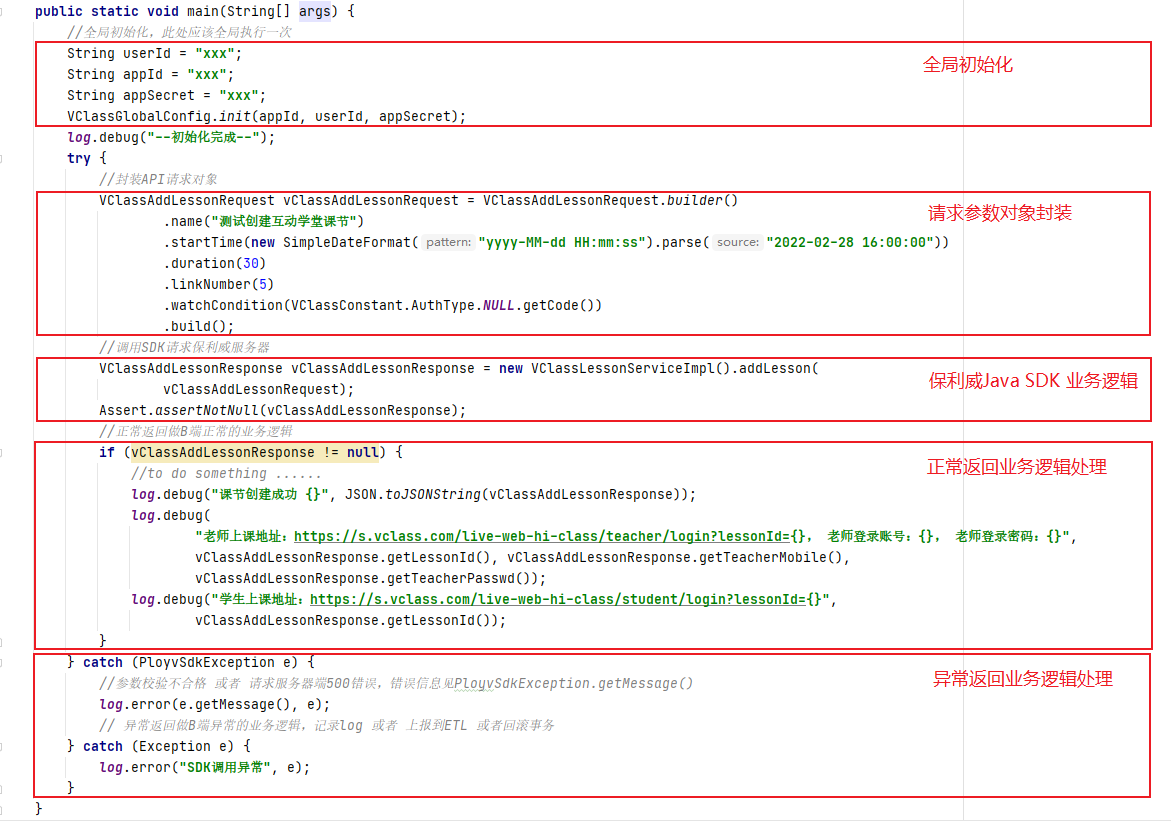
The above business flow diagram is translated into code as follows. All calls to the Polyv Interactive Classroom Java SDK can refer to the following call template (Global initialization only needs to be called once globally).