


Independent Authorization
Feature Path
课节管理 --> 课节详情 --> 观看条件 --> 独立授权
Feature Description
When opening the live streaming viewing page, the URL must carry specified parameters. After the live streaming system verifies the request is legitimate, it directly enters the live viewing page and sets the user-provided parameters as the viewer information on the viewing page. The viewer account returned by the interface must be unique, meaning the same account cannot be logged in from two locations simultaneously; the earlier logged-in account will be kicked out.
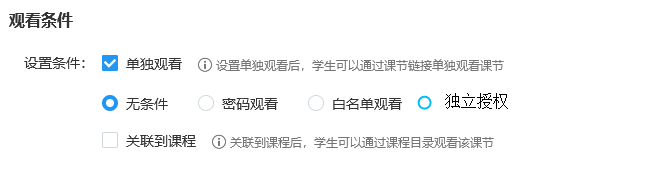
Select the viewing condition as Independent Authorization, and the system will generate it automatically.
Authorization Process Details
After setting the channel to Independent Authorization, obtain the user's independent authorization viewing condition secretkey through the backend or API interface.
When requesting the Polyv live streaming viewing page, relevant parameters must be included, such as:
https://s.vclass.com/live-web-hi-class/student/tokenLogin?lessonId=xx&viewerId=1b448be323×tamp=1498547407000&sign=dd9dc9e42ad7c0204398e925a4ee0f46&name=viewerTests&avatar=http://livestatic.videocc.net/assets/wimages/missing_face.png
- The Interactive Classroom system will compare and verify whether the value of the
signparameter submitted by the user is legitimate. After a successful request, the link will become invalid (the sign can only be used successfully once). If legitimate, the live streaming system will usenickname,viewerId, andavatarto enter the Polyv live streaming viewing page, and the chat area will display the student's nickname and avatar. If verification fails, an error page will be displayed.
Request Parameter Description
| Parameter Name | Required | Type | Description |
|---|---|---|---|
| lessonId | true | Long | Lesson ID |
| viewerId | true | String | Viewer ID, must be unique (max 64 characters) (only supports English uppercase/lowercase letters, numbers, and underscores) |
| timestamp | true | Long | Current 13-digit millisecond timestamp, valid for 3 minutes |
| sign | true | String | Signature for verification. Generation rule: concatenate secretkey + viewerId + secretkey + timestamp (note: no plus signs or spaces) and perform MD5 encryption, resulting in a 32-character uppercase MD5 value |
| name | true | String | Viewer nickname, requires URL-safe base64 encoding |
| avatar | false | String | URL address of the viewer's avatar |
Notes
Signature: Note that the sign value is a 32-character uppercase MD5.
