


Single Sign-On Admin Panel
Updated: 2024-10-21 09:33:43
Description
单点登录可以实现在登录已有系统的状态下,免登录操作进入保利威的账号,做相关设置
Applicable Scenarios
Polyv admin panel single sign-on: Account.
Account: Log into the account admin panel, obtain the highest administrator privileges, manage all courses and lessons, suitable for institutional administrator login redirection.
Important Notes
The interface domain https://hiclass.polyv.net mentioned in this document is the default domain for Polyv SaaS. If the customer has configured a CNAME, it must be modified to the corresponding CNAME domain for API calls; otherwise, the single sign-on functionality may be affected.
How to Operate
1. Operation Flow
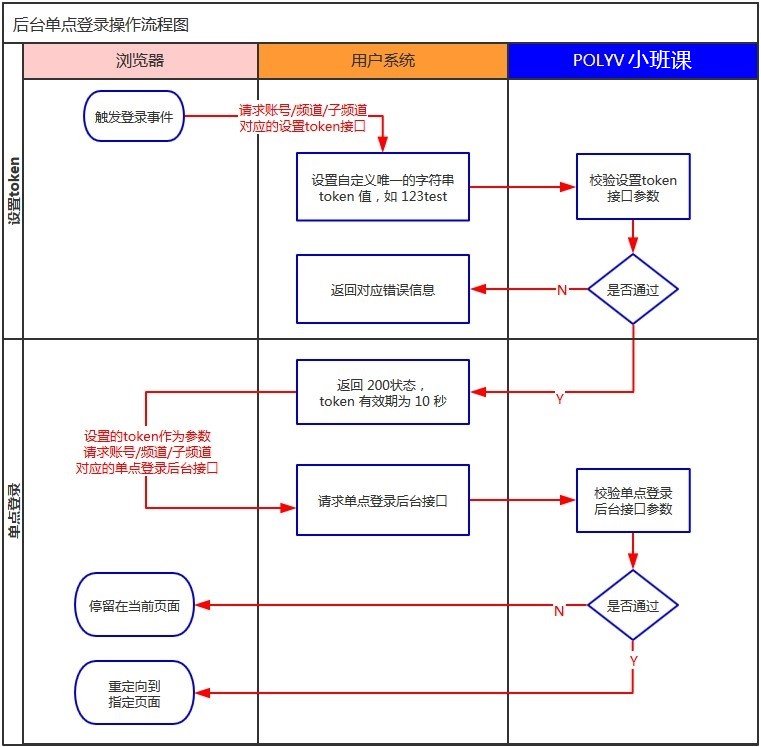
2. API Call Description
| Operation Type | Set Token API (Click to view detailed API call) | Single Sign-On Admin Panel API |
|---|---|---|
| Account | https://api.polyv.net/live/v3/user/set-sso-token | https://hiclass.polyv.net/hi-class-admin/admin/open/user/v1/token-login |
3. Operation Steps
Step 1. Set Single Sign-On Token Parameters
API URL
1.根据操作类型(账号)选择对应的设置token接口URL
    账号:https://api.polyv.net/live/v3/user/set-sso-token
2.接口说明
    支持格式:JSON
    请求方式:POST
    请求数限制:TRUE
    token 参数请勿过于简单,建议使用16位随机字符串
    支持https协议
Request Parameters
| Parameter Name | Required | Type | Description |
|---|---|---|---|
| appId | true | String | Obtained from API settings, the appId registered in the live streaming system |
| timestamp | true | String | Current 13-digit millisecond timestamp, valid for 3 minutes |
| token | true | String | Unique string |
| sign | true | String | Signature, a 32-character uppercase MD5 value |
Successful Response JSON Example
{
    "code": 200,
    "status": "success",
    "message": "",
    "data": "success"
}
Failed Response JSON Example
Missing appId
{
    "code": 400,
    "status": "error",
    "message": "appId is required.",
    "data": ""
}
API Response Field Description
| Parameter Name | Description |
|---|---|
| code | Request status response code |
| status | Request status |
| message | Error message |
| data | Returns "success" string on success |
Step 2. After successfully calling the Set Token API, call the Single Sign-On Admin Panel API to perform authorized login.
API URL
1.根据操作类型(账号)选择对应的单点登录后台接口URL
    账号:https://hiclass.polyv.net/hi-class-admin/admin/open/user/v1/token-login
2.接口说明
    请求方式:GET
    请求数限制:TRUE
    用于获取token后授权登录互动学堂后台
    支持https协议
Request Example
https://hiclass.polyv.net/hi-class-admin/admin/open/user/v1/token-login?userId=userId123&token=token1234&redirect=%2Fadmin%2Fcourse
Request Parameters for Account Operation Type
| Parameter Name | Required | Type | Description |
|---|---|---|---|
| userId | true | String | Account ID |
| token | true | String | The token string set via the Account Token API, valid for 10 seconds and for one-time verification |
| redirect | false | String | Redirect URL after authorization, use URL encoding (default: /admin/lesson; no need to include the domain part.) |
Successful Response Example
Upon successful verification, it will redirect to the corresponding webpage; otherwise, an error will be returned.
