


Authorized Playback Function and Principle for Mobile Web
With the development of mobile video technology, users' demand for watching videos on mobile devices is increasing. The education industry's awareness of mobile video copyright protection is also growing. POLYV has launched an authorized playback function for mobile web to protect the copyright of videos viewed on mobile devices.
To implement the authorized playback function for mobile web, you first need to make the following settings in the POLYV backend:

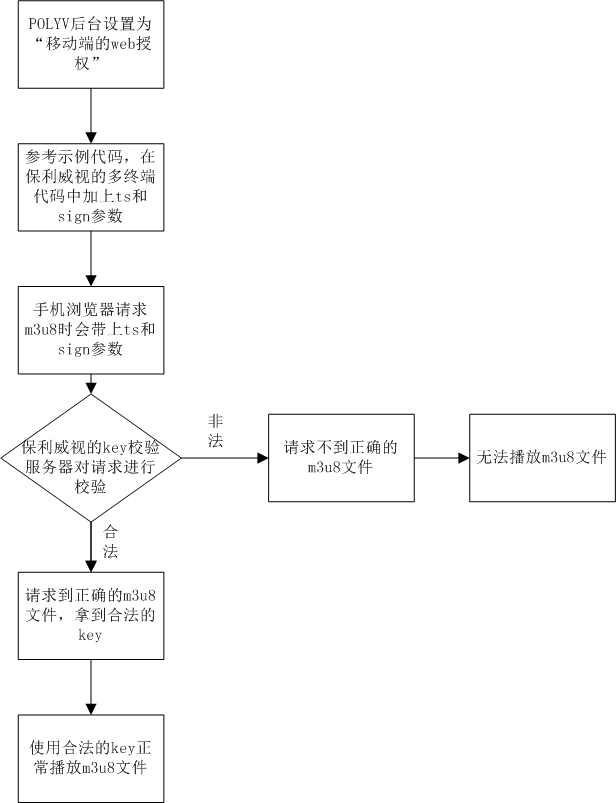
After saving the above settings, you also need to add the ts and sign parameters in the page code. When the mobile browser requests the m3u8 URL, the ts and sign parameters are passed to the m3u8 URL. The m3u8 key authorization server verifies the parameters upon receipt. If the ts and sign parameters are correct, the POLYV key authorization server returns the correct key file to the player. If the ts or sign parameter is incorrect, a 400 error is returned.
The following is an example in PHP, where the ts parameter is the current timestamp multiplied by 1000, and sign is the MD5 result of concatenating secretKey, vid, and ts in order.
<?php
$vid = "e2e84a738354402a52ce81aeab4e3067_e";
$secretKey= "7UagtQOq2A";
$ts=time()*1000;

$hash = md5($secretKey.$vid.$ts);
?>

<script src='http://static.polyv.net/file/polyvplayer_v2.0.min.js'></script>
<div id='plv_e2e84a738354402a52ce81aeab4e3067_e'></div>
<script>
var player = polyvObject('#plv_e2e84a738354402a52ce81aeab4e3067_e').videoPlayer({
    'width':'600',
    'height':'485',
    'vid' : 'e2e84a738354402a52ce81aeab4e3067_e',
    'ts':'<?php echo $ts; ?>',
    'sign':'<?php echo $hash; ?>'
});
</script>
The entire implementation process of the authorized playback function for mobile web is shown in the following diagram:
So, how does POLYV protect the m3u8 files accessed from mobile devices?
First, let's look at the specific content inside the m3u8 file.

Among them, the key used to decrypt the ts files during playback in the m3u8 file is shown below:

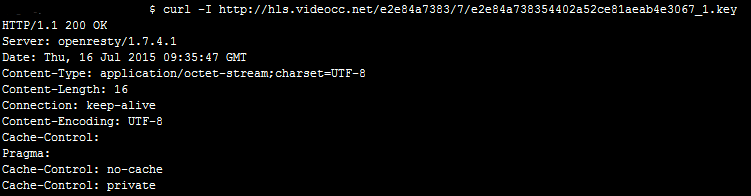
Next, under "Open Authorization" (set in "POLYV Backend" -> "Video Settings" -> "Mobile Encryption Settings"), directly accessing the key file http://hls.videocc.net/e2e84a7383/7/e2e84a738354402a52ce81aeab4e3067_1.key returns a normal 200 response. As shown below:
If under "Web Authorization", directly accessing the key file http://hls.videocc.net/e2e84a7383/7/e2e84a738354402a52ce81aeab4e3067_1.key returns an abnormal 400 error. As shown below:

So, under "Web Authorization", how can you legally and correctly request the m3u8 file using POLYV's mobile web authorized playback function to obtain a valid key file?
First, retrieve the ts (timestamp) and sign parameters from the user's page code. Append these two parameters to the original m3u8 URL to obtain a valid m3u8 URL http://hls.videocc.net/e2e84a7383/7/e2e84a738354402a52ce81aeab4e3067_1.m3u8?ts=1437043087000&sign=7318672c72cc6a1991cf3817537900e3, and request the valid m3u8 file. As shown below:

Next, obtain the valid key URL http://hls.videocc.net/e2e84a7383/7/e2e84a738354402a52ce81aeab4e3067_1.key?ts=1437043087000&sign=9cc24d16d03623e74041e3a757dffa65 from the valid m3u8 file, request the valid key file, and receive a 200 response. As shown below:

Since under "Web Authorization", the key file has a lifetime of 5 minutes. After 5 minutes, the previous key file becomes invalid, and accessing the original key file returns a 400 error. As shown below:

