


Courseware Player (Three-Screen) — Launch Announcement
Updated: 2022-05-16 10:08:41
To synchronize courseware and instructional videos, POLYV provides a courseware player for online education customers.
The courseware player offers powerful features:
- Auto-generation: No professional software required. Upload a video + courseware PPT (PDF) to automatically generate a "three-screen courseware player." Embed the code into your page and use it — simple and fast!
- Rich customization options: Customize the courseware outline title/time points, the player's main color, main screen position (left/right), main/secondary screen/outline dimensions, and default display (video/courseware) for the main and secondary screens.
- Sequential/jump playback: The courseware automatically jumps to the corresponding page based on the video playback time. Learners can also click the table of contents to jump the video to the corresponding time point.
- Main/secondary screen switching: Freely switch the video or courseware to the main screen for playback.
- Full-screen mode: Both courseware and video can be played in full screen independently. Video full-screen mode is mainly suitable when the teaching focus is on the teacher's body language or facial expressions. Courseware full-screen mode is better when learners focus more on the knowledge content rather than the teacher's expressions.

The courseware player can be configured in two ways: one is to integrate it into your own website via the API interface provided by POLYV engineers; the other is to operate it through the POLYV backend.
POLYV backend operation method:
- Upload the video.
- Click "Modify" in the red box shown in Figure 1.
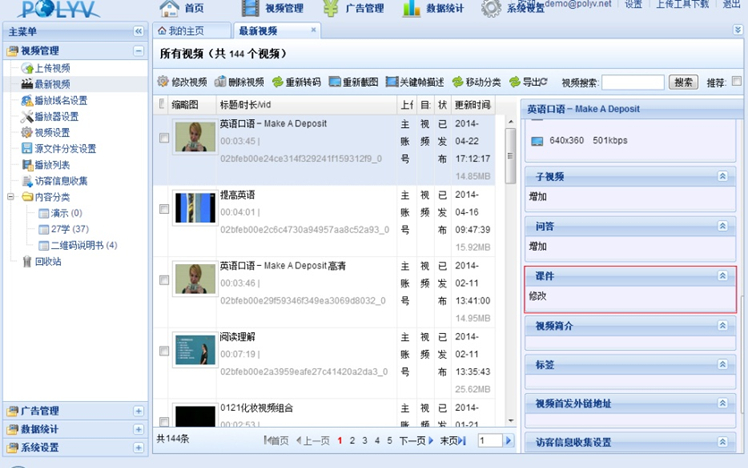
Figure 1
3. Set the time in Figure 2, and copy the code in the lower-left corner to embed it into your webpage.
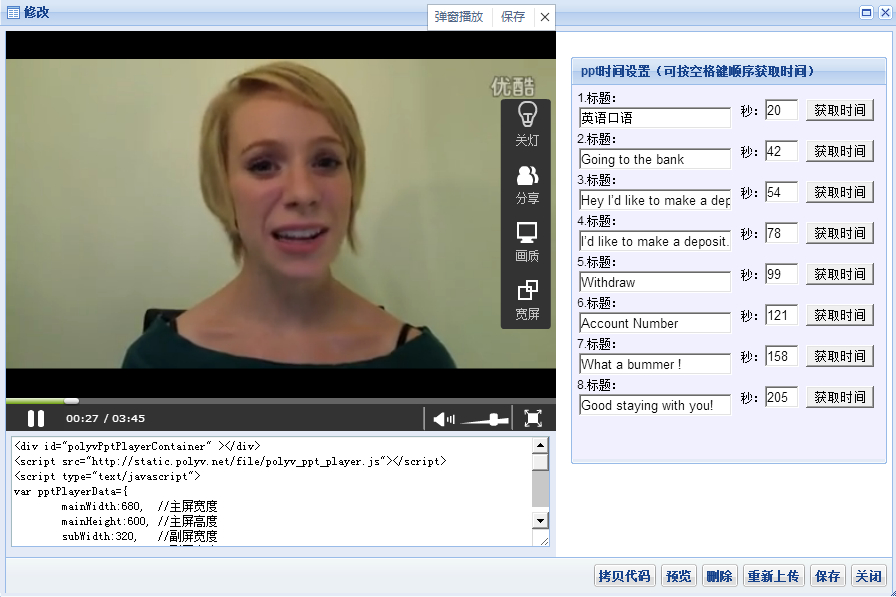
Figure 2
