


Graphic Promotion Link
Updated: 2022-05-24 14:25:56
Graphic Promotion Link: Click "Video List" in the top function bar to enter the video list interface. Select a video (or select a video in the "Video Category Management" interface), then find "Promotion Link" in the small window on the right, as shown below:

After clicking "Promotion Link", the following interface appears. Complete the editing and click "Save".
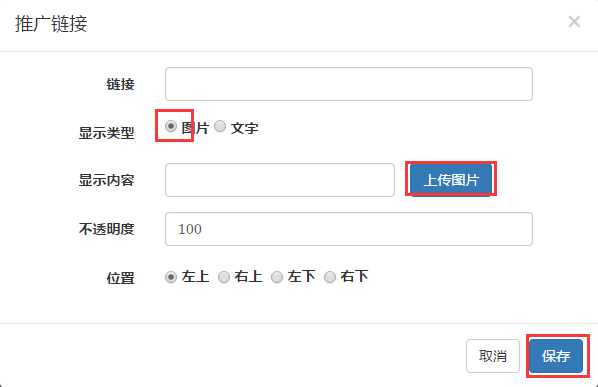
Link: Enter the URL to redirect to when the image is clicked.
Display Type: Select "Image".
Display Content: Click "Upload Image" and select the desired image to upload.
Opacity: Customize the opacity level (0% - 100%).
Position: Set the graphic promotion link to the top-left, bottom-left, top-right, or bottom-right of the video for flexible display.
Graphic Promotion Link Effect: Viewers can click the promotion link graphic to directly access the webpage.
