6 Video Upload
6.1 Overview
PLVVodUploadSDK is an SDK provided by Yifang Information Technology Co., Ltd. that can be integrated into projects for uploading video files to a server on iOS devices, supporting resumable upload. To use this SDK, you need to register an account on the Polyv Video Cloud Platform and log in with that account. Uploaded video files can be viewed, edited, played, deleted, etc., on this video platform.
6.2 File Directory
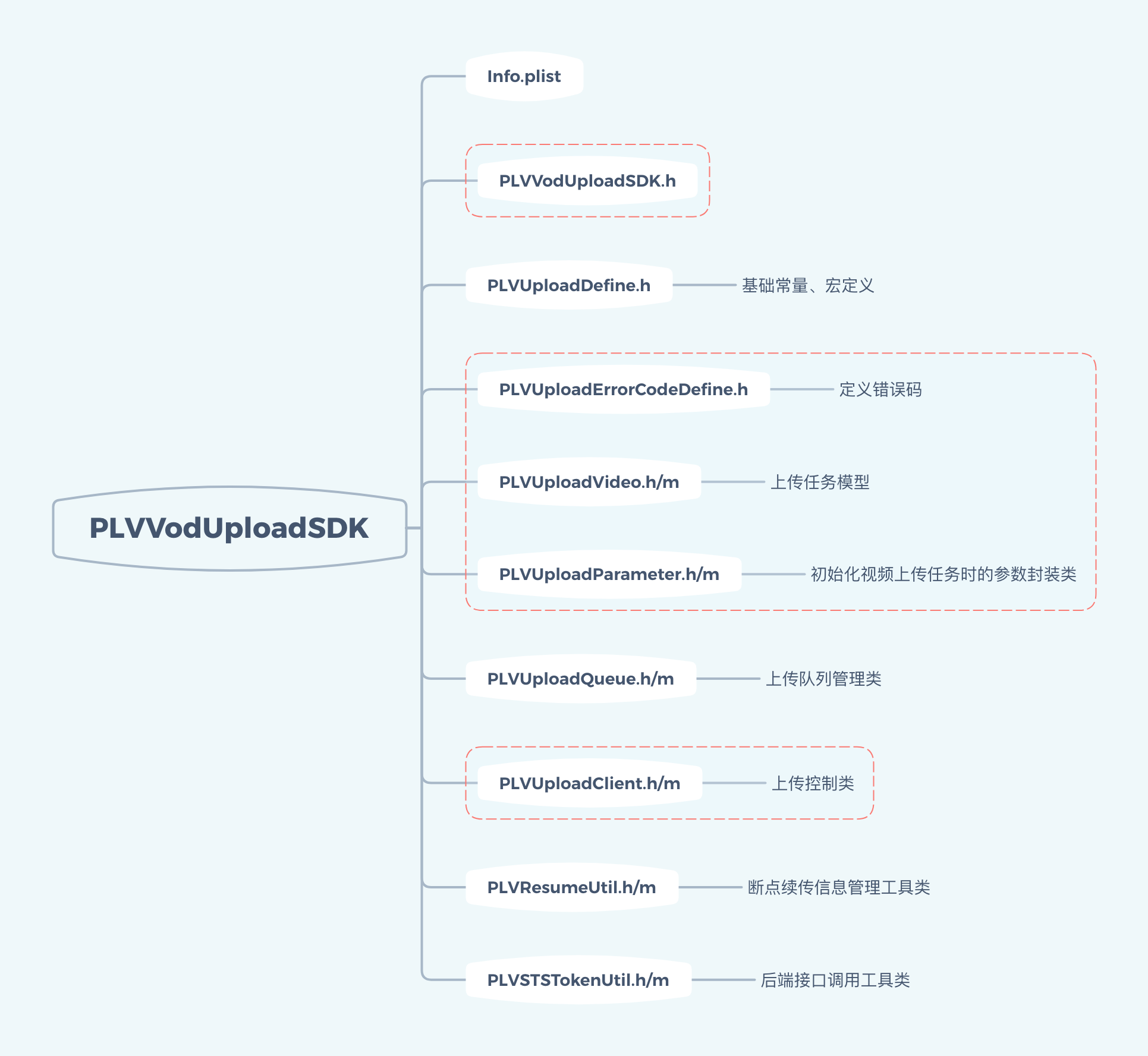
The file directory of PLVVodUploadSDK is as follows, where the red dashed box contains the SDK's public files:
6.3 Getting Started with Integration
The upload SDK supports iOS devices with iOS 8.0 and above, requiring Xcode 10.0 or higher development environment and CocoaPods 1.5.3 or higher. For instructions on installing CocoaPods, refer to section 2.2 of the document "2. Quick Integration."
Add the following content to the Podfile:
pod 'PLVVodUploadSDK'
Then, use a terminal tool to navigate to the project path and execute the following command:
$ pod install
6.4 SDK Login
PLVUploadClient is the operation class for login and upload requests. Use the method -loginWithUserId:secretKey: of PLVUploadClient to log in. The method declaration is as follows (parameters userId and secretKey can be obtained by logging into the Polyv Video Cloud Platform):
/**
 SDK 登录
 @param userId 用户 ID
 @param secretKey 用户 secretKey
 */
- (void)loginWithUserId:(NSString *)userId secretKey:(NSString *)secretKey;
Taking SDK login in AppDelegate as an example, the sample code is as follows:
- (BOOL)application:(UIApplication *)application didFinishLaunchingWithOptions:(NSDictionary *)launchOptions {
    NSString *userId, secretKey; // 初始化为用户自己的 userId、secretKey
    [[PLVUploadClient sharedClient] loginWithUserId:userId secretKey:secretKey];
    ……
}
Login failures or changes in upload status are notified via a delegate protocol, which is PLVUploadClientDelegate. PLVUploadClient supports multiple delegates, allowing multiple classes to listen simultaneously. Use the method -addDelegate: of PLVUploadClient to add a delegate, and use the method -removeDelegate: to remove a delegate. The code example is as follows:
#import <PLVVodUploadSDK/PLVVodUploadSDK.h>

@interface UIViewController ()<
PLVUploadClientDelegate
>
@end

@implementation UIViewController

- (void)viewDidLoad {
    [super viewDidLoad];

    [[PLVUploadClient sharedClient] addDelegate:self];
}

- (void)dealloc {
    [[PLVUploadClient sharedClient] removeDelegate:self];
}


- (void)uploadClientLoginError:(NSError *)error {
    NSLog(@"登录 SDK 失败,失败原因:%@", error.userInfo);
}
@end
Setting the property enableLog of PLVUploadClient can enable debug logs in the console. The default value of enableLog is NO. The code example for enabling logs is as follows:
[PLVUploadClient sharedClient].enableLog = YES;
6.5 Callback Listening
The protocol PLVUploadClientDelegate contains the following delegate methods, all of which are optional. Developers can use them as needed:
/**
 SDK 登录失败
 @param error 失败 error (含错误码和 userInfo )
 */
- (void)uploadClientLoginError:(NSError *)error;

/**
 初始化上传过程中遇到失败
 @param error 失败 error (含错误码和 userInfo )
 */
- (void)prepareUploadError:(NSError *)error fileURL:(NSURL *)fileURL;

/**
 启动上传任务失败
 @param vid 失败的视频 vid
 */
- (void)startUploadTaskFailure:(NSString *)vid;

/**
 某一个任务被加入等待队列
 @param video 等待上传的任务( PLVUploadVideo 对象)
 */
- (void)waitingUploadTask:(PLVUploadVideo *)video;

/**
 开始上传某一个任务
 @param video 开始上传的任务( PLVUploadVideo 对象)
 */
- (void)startUploadTask:(PLVUploadVideo *)video;

/**
 上传结束
 如果成功,error 为 nil
 @param video 上传结束的任务( PLVUploadVideo 对象)
 @param error 如果上传失败,回传失败的 NSError 对象指针
 */
- (void)didUploadTask:(PLVUploadVideo *)video error:(NSError * __nullable)error;

/**
 上传任务进度变化
 注意:该方法运行在后台线程,非主线程!
 @param vid 视频 vid
 @param progress 上传进度(大于 0 小于 1)
 */
- (void)uploadTask:(NSString *)vid progressChange:(float)progress;

/**
 所有任务上传结束(包括成功或失败,不包含被中止/中断的任务)
 */
- (void)didAllUploadTaskComplete;
6.6 Uploading Videos
6.6.1 Upload Task Initialization
Use the method -uploadVideoAtFileURL: of PLVUploadClient to initialize an upload task. The parameter fileURL is the local storage path URL of the file to be uploaded. If the task initialization is successful, this method returns nil; otherwise, it returns a NSError object. The method declaration is as follows:
/**
 上传视频文件
 @param fileURL 视频文件本地 URL
 @return 如果出错,返回一个 NSError 对象,如果没有,返回 nil
 */
- (NSError *)uploadVideoAtFileURL:(NSURL *)fileURL;
Note: Before uploading a file, it must be copied to the sandbox folder of the app that intends to integrate the upload SDK. Otherwise, iOS permission restrictions will prevent access. Therefore, fileURL must be a path within the app's sandbox folder.
If the task initialization is successful, this method returns nil; otherwise, it returns a NSError object. The reason for initialization failure can also be obtained via the delegate method -prepareUploadError:fileURL:. The sample code is as follows:
- (void)prepareUploadError:(NSError *)error fileURL:(NSURL *)fileURL {
    NSLog(@"文件 %@ 上传初始化失败", [fileURL path]);
}
6.6.2 Upload Task Queue
Upload tasks are added to the upload task queue in the order of initialization. The maximum concurrency of the task queue is 3. Tasks exceeding the concurrency limit will enter a waiting state until other tasks are completed. By listening to the delegate methods -waitingUploadTask: and -startUploadTask:, you can know the changes in the task queue:
- (void)waitingUploadTask:(PLVUploadVideo *)video {
    // 上传任务 video 被加入队列中,进入等待状态
}

- (void)startUploadTask:(PLVUploadVideo *)video {
    // 上传任务 video 被加入队列中,准备开始上传
}
PLVUploadVideo is the data model for upload tasks. The property vid is the unique identifier of the PLVUploadVideo object. Through the method -videoWithVid: of PLVUploadClient, you can obtain the PLVUploadVideo object for a specific vid in the upload task queue. If the object does not exist, nil is returned. Through the method -allUploadVideos, you can obtain all tasks in the upload task queue. The declarations of these two methods are as follows:
/**
 返回所有上传中或等待上传的任务
 status 为 PLVUploadStatusWaiting, PLVUploadStatusUploading, PLVUploadStatusResumable
 @return 上传任务数组,数组元素为 PLVUploadVideo 对象
 */
- (NSArray <PLVUploadVideo *>*)allUploadVideos;

/**
 在上传中或等待上传的任务队列中,查找指定 vid 的上传任务
 @param vid 上传任务对应的视频 vid
 @return 上传任务( PLVUploadVideo 对象)
 */
- (PLVUploadVideo *)videoWithVid:(NSString *)vid;
6.6.3 Upload Progress Monitoring
The PLVUploadVideo object contains a block property uploadProgress, through which the upload progress of each upload task can be monitored. The code example is as follows:
PLVUploadVideo *video; // 通过前面提到的 delegate 方法返回的
video.uploadProgress = ^(float progress) {
  NSLog(@"任务 vid:%@ 的上传进度为 %f", video.vid, progress);
});
It can also be monitored via the delegate method -uploadTask:progressChange:. The sample code is as follows:
- (void)uploadTask:(NSString *)vid progressChange:(float)progress {
    NSLog(@"任务 vid:%@ 的上传进度为 %f", vid, progress);
}
6.6.4 Upload Suspension or Completion
To suspend an ongoing upload task, call the method -abortUploadWithVid: of PLVUploadClient. The method declaration is as follows:
/**
 中止视频上传
 适用于 status 为 PLVUploadStatusWaiting, PLVUploadStatusUploading 的上传任务
 @param vid 上传任务的 vid
 */
- (void)abortUploadWithVid:(NSString *)vid;
After the call, the task will be suspended synchronously. A suspended task cannot be resumed or retransmitted. It can only be reinitialized using the method in 6.6.1.
When an upload ends, whether successful, failed, or suspended, the delegate method -didUploadTask:error: will be notified. If successful, error is nil. The sample code is as follows:
- (void)didUploadTask:(PLVUploadVideo *)video error:(NSError *)error {
    if (error) {
        NSLog(@"任务 vid:%@ 上传失败,失败原因 %@", video.vid, error.userInfo);
    } else {
        NSLog(@"任务 vid:%@ 上传成功", video.vid);
    }
}
When all upload tasks added to the queue are completed (both success and failure count as completion), the delegate method -didAllUploadTaskComplete will be called. The sample code is as follows:
- (void)didAllUploadTaskComplete {
    NSLog(@"所有任务上传结束");
}
6.6.5 Resuming Failed Tasks
If an upload fails and the error code is PLVClientErrorCodeOSSErrorCanResumeUpload, use the method -retryUploadWithVid:fileURL: of PLVUploadClient to resume the upload. The method declaration is as follows:
/**
 恢复视频上传
 适用于 status 为 PLVUploadStatusResumable 的上传任务
 @param vid 上传任务的 vid
 @param fileURL 上传文件的 URL
 */
- (void)retryUploadWithVid:(NSString *)vid fileURL:(NSURL *)fileURL;
If the resume task starts successfully, you will receive a notification via the delegate method -waitingUploadTask: or -startUploadTask:, as in 6.6.2. If the start fails, you will receive a notification via the delegate method -startUploadTaskFailure:. The sample code is as follows:
- (void)startUploadTaskFailure:(NSString *)vid {
    NSLog(@"任务 vid:%@ 上传启动失败", vid);
}
6.6.6 More Upload Parameters
In addition to the method -uploadVideoAtFileURL: of PLVUploadClient mentioned in 6.6.1, we can also use the following method to define more parameters for the upload task:
/**
 上传视频文件
 @param uploadParameter 参数封装类(包含更多自定义参数)
 @return 如果出错,返回一个 NSError 对象,如果没有,返回 nil
 */
- (NSError *)uploadVideoWithMutipleParameter:(PLVUploadParameter *)uploadParameter;
The parameter uploadParameter contains multiple custom parameters for the upload task, including which category directory to upload to, whether to record the screen, whether to keep the source file, the video file description, and the video file tags. Except for the local storage path of the video file, which is a non-nullable attribute, other attributes have default values if not set. The property declarations of the PLVUploadParameter class are as follows:
/**
 初始化视频上传任务时的参数封装类
 */
@interface PLVUploadParameter : NSObject

/**
 待上传的视频文件的本地存储 URL
 */
@property (nonatomic, strong) NSURL *fileURL;

/**
 上传目录分类 ID,默认为根目录(ID 为 1)
 */
@property (nonatomic, assign) long long catalogId;

/**
 是否录屏,默认为否
 */
@property (nonatomic, assign) BOOL screenRecord;

/**
 是否保持源文件,默认为否
 */
@property (nonatomic, assign) BOOL keepSource;

/**
 待上传的视频文件描述,可选,不传默认为空
 */
@property (nonatomic, copy) NSString * __nullable videoDescription;

/**
 待上传的视频文件标签,可选,不传默认为空
 */
@property (nonatomic, copy) NSString * __nullable videoTag;

@end
6.7 Cropping the Upload Module
If the upload functionality is not needed in the business, the upload module can be removed from the VOD demo. After removal, the upload function will be unavailable.
6.7.1 Modifying the Podfile
Comment out the following two libraries in the Podfile, then re-execute pod install.
# pod 'PLVVodUploadSDK'
# pod 'TZImagePickerController', '~> 3.2.0'
6.7.2 Removing Open Source Files
The open-source code related to the upload module is located in the PolyvVodSDKDemo/Classes/Upload folder. Remove this folder from the project. Right-click and select [Delete], then choose [Move to Trash].
6.7.3 Removing the Upload Module Entry
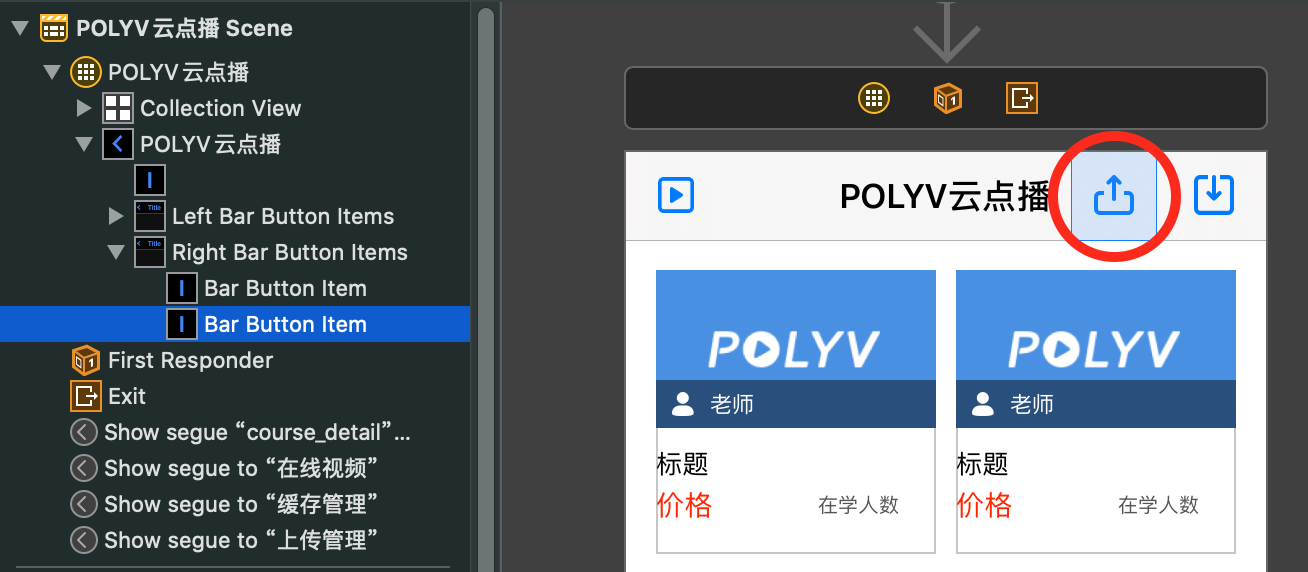
The entry for the upload module is located in the upper right corner of the home page navigation bar. Open the Main.storyboard file and delete the entry button, as shown in the figure below:
6.7.4 Removing SDK Registration
Remove the following code from the -application:didFinishLaunchingWithOptions: method in the AppDelegate.m file:
[[PLVUploadUtil sharedUtil] loginUploadClient];
And remove the related header file imports:
#import "PLVUploadUtil.h"
6.7.5 Removing the Framework
If you run the project directly at this point, you will encounter the following error:
ld: framework not found PLVVodUploadSDK
clang: error: linker command failed with exit code 1 (use -v to see invocation)
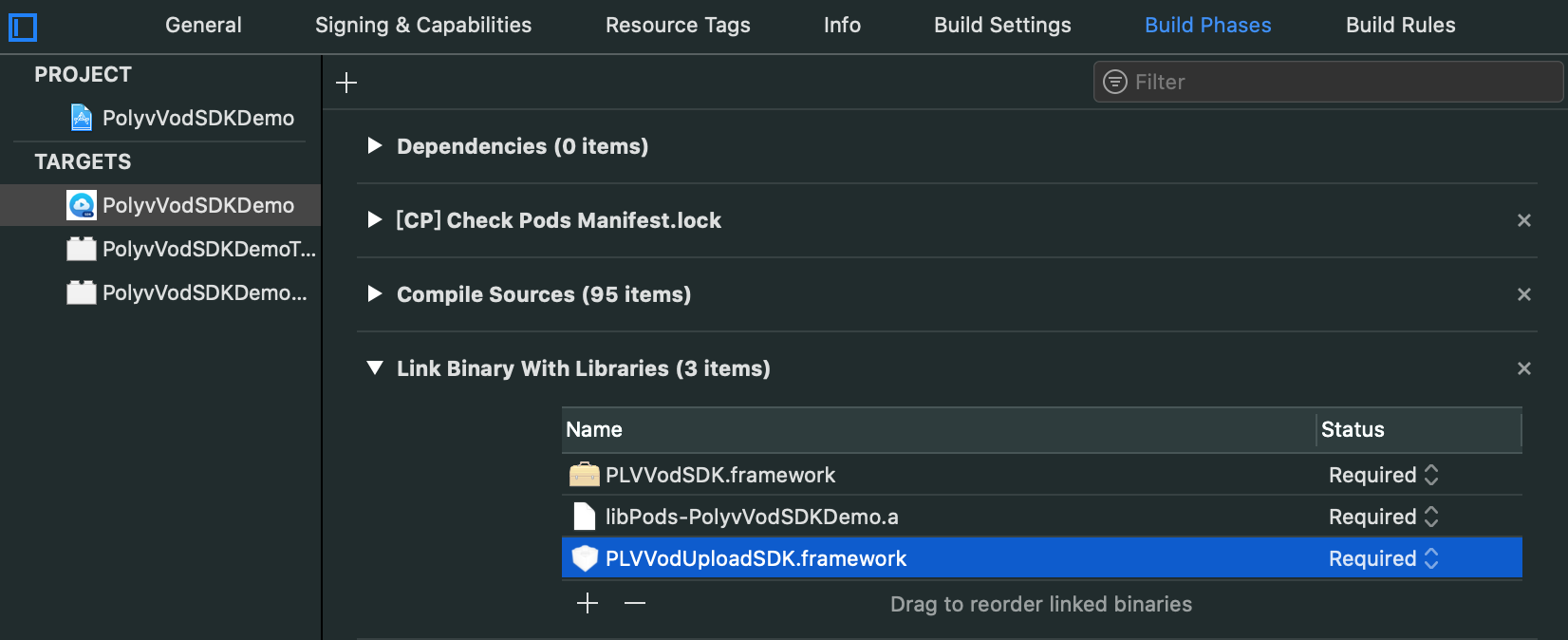
Open TARGETS, select Build Phases, and in Link Binary With Libraries, delete PLVVodUploadSDK.framework: