


3 Initialization
3.1 Project Configuration
3.1.1 Adding Permissions
Since the player in the VOD project saves screenshots directly to the system photo album during playback, and users also need to access the system photo album to obtain video files before uploading, you need to add read and write permissions for the system photo album in the project's Info.plist file.
Additionally, this project supports background playback, so you also need to enable the background playback permission. The new content added to the Info.plist file is as follows:
<?xml version="1.0" encoding="UTF-8"?>
<!DOCTYPE plist PUBLIC "-//Apple//DTD PLIST 1.0//EN" "http://www.apple.com/DTDs/PropertyList-1.0.dtd">
<plist version="1.0">
<dict>
    ……
    <key>NSPhotoLibraryUsageDescription</key>
    <string>允许App访问相册以保存截图或读取相册视频文件</string>
    <key>UIBackgroundModes</key>
    <array>
    <string>audio</string>
    </array>
    ……
</dict>
</plist>
3.1.2 Supporting Portrait and Landscape Orientation
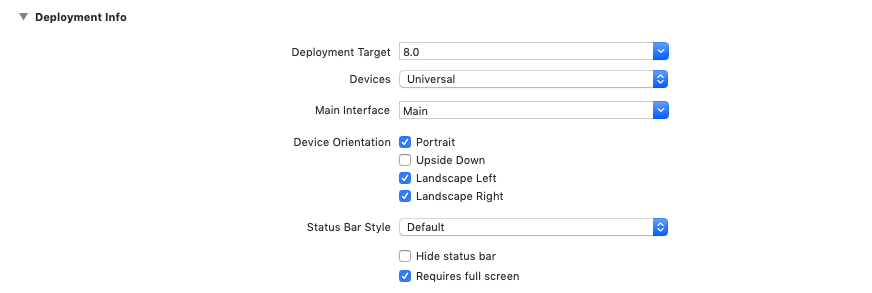
This project supports both portrait and landscape playback. Select the General menu bar of Targets, and configure it in Deployment Info as shown below:
3.2 SDK Configuration
The Polyv VOD SDK requires users to provide four configuration parameters: useId, readtoken, writetoken, and secretkey. For details on the purpose of these parameters, refer to the Polyv Cloud VOD - Server API User Manual - Glossary. For security reasons, it is recommended to store these parameters on the server side, and have the APP retrieve and configure them from the server upon startup.
To prevent these parameters from being sniffed on the APP side, the transmitted content needs to be encrypted. Therefore, SDK加密串 is introduced—encrypting the above four parameters on the server side, and decrypting them correspondingly on the APP side. Developers should design their own encryption and decryption methods, and the APP side should request the server interface via the https protocol.
For quick integration and debugging of SDK functionalities, the Polyv management backend provides a temporary SDK encryption string with a fixed encryption method. Do not use it directly in a production environment.
3.2.1 Account Configuration
The class PLVVodSettings in the VOD SDK provides the following methods for SDK configuration.
The most recommended method is to use an https interface to obtain the encrypted string from the server, decrypt it locally on the APP (developers design their own encryption and decryption methods) to obtain useId, readtoken, writetoken, and secretkey, and then use the following method for SDK configuration.
/// 通过 userid、readtoken、writetoken、secretkey 配置账号
+ (instancetype)settingsWithUserid:(NSString *)userid
                         readtoken:(NSString *)readtoken
                        writetoken:(NSString *)writetoken
                         secretkey:(NSString *)secretkey;
Secondly, the VOD SDK provides a fixed encryption method that developers can use during development. However, due to its lower security compared to the first method, it is not recommended for production environments. The encryption string, encryption key, and encryption vector can be obtained from the Polyv Video Cloud Platform. Note: The character length of the encryption key and encryption vector must be 16 bits.
/// 通过加密串 configString、加密密钥 key、加密向量 iv 配置账号
+ (instancetype)settingsWithConfigString:(NSString *)configString key:(NSString *)key iv:(NSString *)iv error:(NSError **)error;
If error is nil, the four configuration parameters of the Polyv VOD SDK can be read from the read-only properties userId, readtoken, writetoken, and secretkey of the PLVVodSettings object returned by the above method.
For companies with high security requirements, the APP can be hardened to prevent it from being cracked or analyzed on jailbroken devices, which could lead to the leakage of account and user privacy data. There are many products available on the market for hardening iOS applications.
3.2.2 Log Configuration
The VOD SDK internally uses its own log level system, where log levels are defined using bitwise operators. Therefore, developers can combine them as needed using | (bitwise OR) to set personalized log levels. The log level can be set by modifying the property logLevel of the PLVVodSettings object. The default log level is:
/// 日志等级
typedef NS_OPTIONS(NSUInteger, PLVVodLogLevel) {
    PLVVodLogLevelSilent = 0,       // 禁用日志输出
    PLVVodLogLevelError  = 1 << 0,    // 只输出错误日志
    PLVVodLogLevelWarn   = 1 << 1,    // 只输出警告日志
    PLVVodLogLevelInfo   = 1 << 2,    // 只输出信息日志
    PLVVodLogLevelDebug  = 1 << 3,    // 只输出调试日志
    PLVVodLogLevelWithoutDebug = PLVVodLogLevelError | PLVVodLogLevelWarn | PLVVodLogLevelInfo,
    PLVVodLogLevelAll    = 0xFFFFFFFF,
};
Additionally, by modifying the properties viewerId and viewerName of the PLVVodSettings object, you can add the account ID and account nickname of the end user (App user) to the log system. An example of log configuration code is as follows:
[PLVVodSettings sharedSettings].logLevel = PLVVodLogLevelAll; // 禁用日志输出
[PLVVodSettings sharedSettings].viewerId = @"账号ID";
[PLVVodSettings sharedSettings].viewerName = @"账号昵称";
It is recommended to perform log configuration immediately after account configuration.
