


14 FAQ
14.1 Demo Rejected for Using Private API
Issue: Violation of Apple's App Store Review Guideline 2.5.1, keyword: App-Prefs:root=
Solution: In version 2.4.0 and below, the demo uses Apple's private API, causing app rejection. Modify the following code (PLVVodPlayerSkin.m):
NSURL *settingURL = [NSURL URLWithString:@"App-Prefs:root=Privacy&path=PHOTOS"];
Update to:
NSURL *settingURL = [NSURL URLWithString:UIApplicationOpenSettingsURLString];
14.2 Running Enterprise Apps on iOS 9 and Later
Starting from iOS 9, Apple imposes stricter restrictions on running enterprise-signed apps. Therefore, on iOS 9, after installing an enterprise-signed app, it cannot be launched directly. By default, when running an enterprise-signed app on iOS 9, a prompt like this appears:
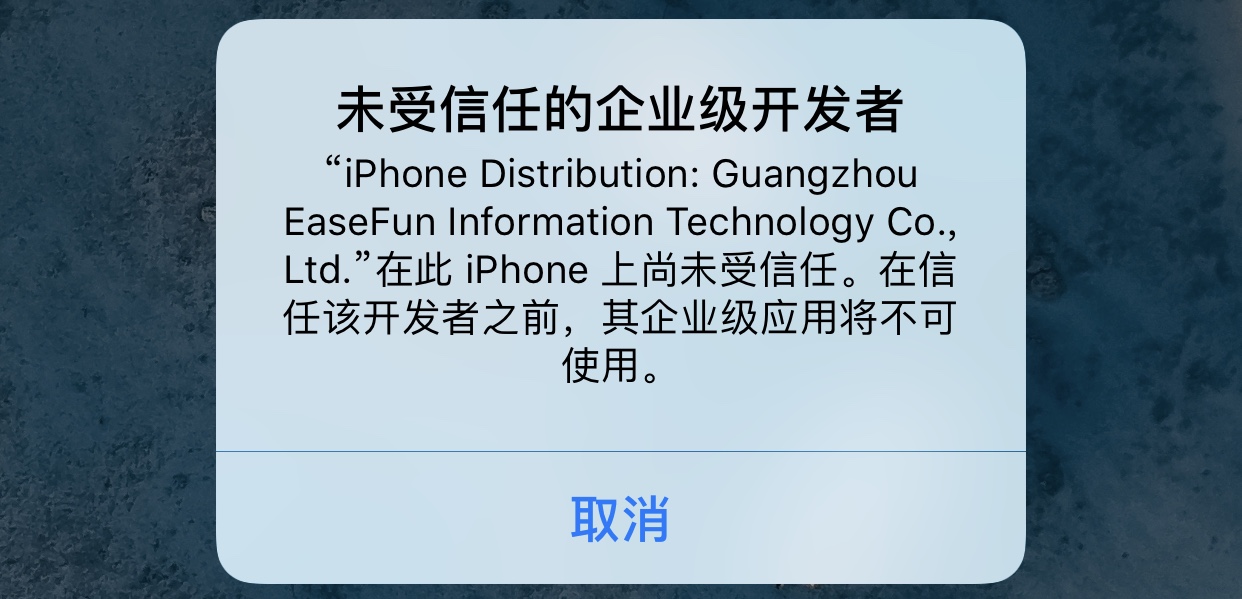
As you can see, the app no longer launches directly as in previous versions, but instead shows a security prompt. If you confirm the app is safe to run, follow these steps:
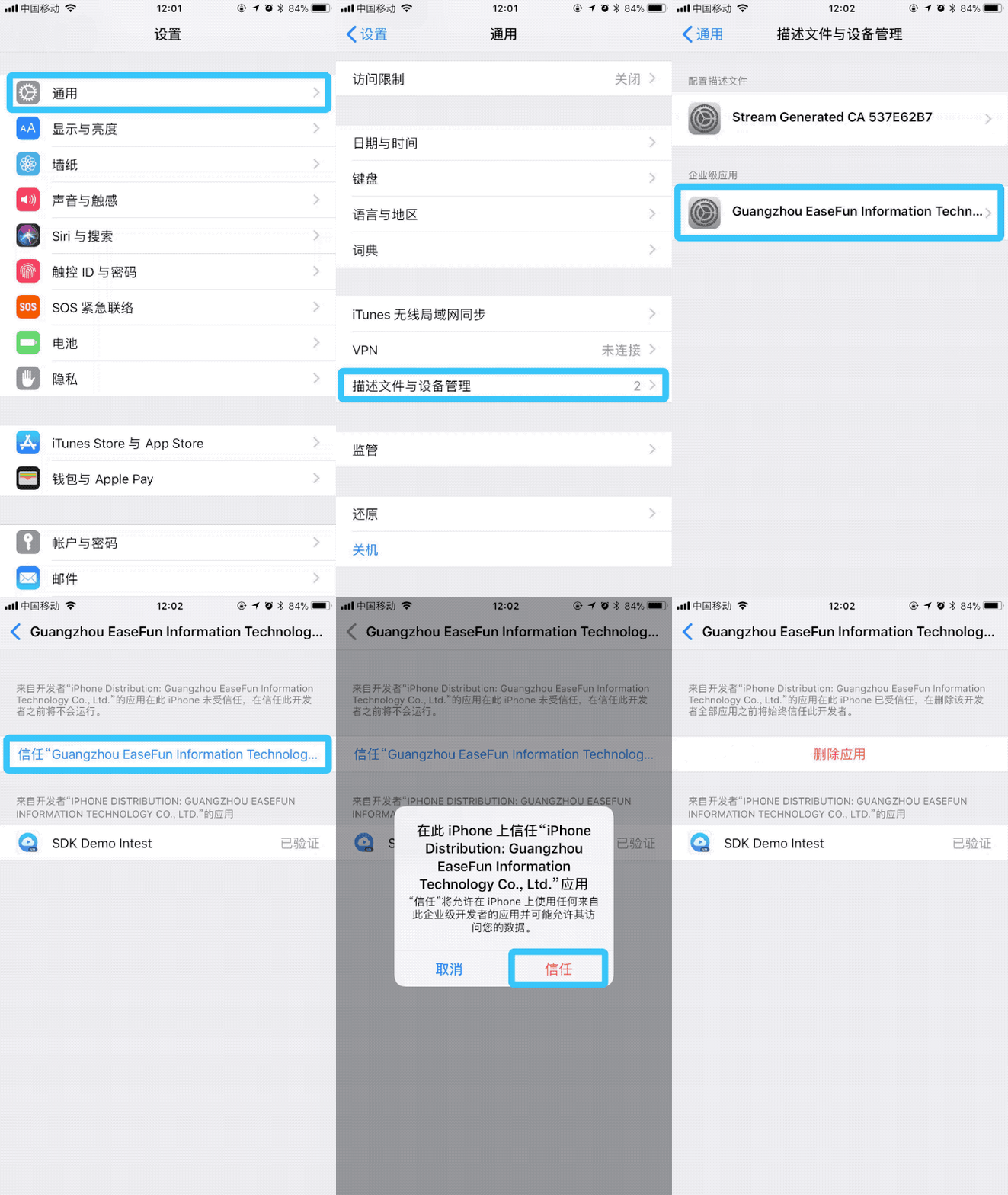
Open 设置 - 通用 - 描述文件与设备管理 (called 设备管理 after iOS 9.2). You will see a profile description similar to the text in the prompt. Tap the corresponding profile to enter, then tap the 信任 button to allow the system to run apps with this certificate.
After that, return to the home screen and relaunch the app. It should now open normally.
The complete steps are shown in the image below:
14.3 Resolving Alibaba HTTPDNS Library Conflicts
Step 1: Integrate the VOD SDK version without the HttpDNS library.
For VOD SDK versions before v2.8.1:
pod 'PolyvVodSDK/NoAliLib', '~>2.8.0'
For VOD SDK versions after v2.9.0:
pod 'PolyvVodSDK/NoAli', '~>2.9.0'
Step 2: Integrate the following three HttpDNS dependency libraries required by the VOD SDK separately based on the conflict situation:
 'PolyvAliHttpDNS/AlicloudHttpDNS', '~> 1.7.4'
 'PolyvAliHttpDNS/AlicloudUtils', '~> 1.7.4'
 'PolyvAliHttpDNS/UTDID', '~> 1.7.4'
Example:
If a customer integrates both VOD SDK 2.9.1 and Alipay SDK (which includes UTDID), the conflict resolution integration plan is as follows:
pod 'PolyvVodSDK/NoAli', '~>2.9.0'
pod 'PolyvAliHttpDNS/AlicloudHttpDNS', '~> 1.7.4'
pod 'PolyvAliHttpDNS/AlicloudUtils', '~> 1.7.4'
14.4 How to Modify Playback Speed Options
The playback speed "option list" in the older VOD iOS SDK is part of the Demo skin UI layer configuration. If you use the skin provided by the older Demo (rate selection panel PLVVodPlaybackRatePanelView), you need to modify the playbackRates array maintained in the speed panel to add/delete/adjust speed levels.
Below is an example of adding a 2.5x speed option.
Steps
- Step 1: Modify
PLVVodPlaybackRatePanelView.minplaybackRates
File path:
polyv-ios-vod-sdk-demo/PolyvVodSDKDemo/PolyvOpenSourceModule/Skin/View/PLVVodPlaybackRatePanelView.m
Before modification:
if (@available(iOS 16.0, *)) {
    self.playbackRates = @[@0.5, @0.75, @1.0, @1.25, @1.5, @2.0, @3.0];
} else {
    self.playbackRates = @[@0.5, @0.75, @1.0, @1.25, @1.5, @2.0];
}
After modification: Insert 2.5 between 2.0 and 3.0 (recommended to keep ascending order):
if (@available(iOS 16.0, *)) {
    self.playbackRates = @[@0.5, @0.75, @1.0, @1.25, @1.5, @2.0, @2.5, @3.0];
} else {
    self.playbackRates = @[@0.5, @0.75, @1.0, @1.25, @1.5, @2.0];
}
After completing the modification, recompile and run the demo. You will see the newly added 2.5x option in the rate selection panel.
Related Notes
- How speed takes effect: The older SDK sets the playback speed via
PLVVodPlayerViewController.playbackRate; the setter internally syncs tomainPlayer.playbackRateand notifies the skin layer to refresh the display. - System speed limit: The older SDK has protection logic for speeds below
iOS 16(when readingplaybackRate, the maximum is treated as2.0). Therefore, if you wish to provide2.5x/3.0x, it is recommended to only enable it in theiOS 16+speed list.
