


保利威 PC 點播 SDK 整合文件
更新時間:2025-06-13 14:43:21
本文為您介紹保利威 C++/C# 播放 SDK 本地整合的操作步驟和說明。
clone 專案
使用 git clone 專案
git clone https://github.com/polyv/polyv-player-sdk-demo.git
外部依賴
- 本 demo UI 依賴 Qt5 或 Qt6 框架,請自行到 Qt 發佈站下載。
- Python 編譯處理腳本,請自行到官網下載安裝。
- CMake
- OpenSSL 1.0.2 以上
- curl
- 注意其中 openssl curl 本倉庫 thirdparty 自帶,若有衝突,請自行替換。
本地整合
- plv-player-sdk 資料夾:包含 SDK 標頭檔以及 lib、dll、dylib 檔案,使用 PlvPlayerSDK.cmake 拉取。
- mac
- x86_64
- include
- lib
- arm64
- include
- lib
- x86_64
- windows
- x86
- include
- lib
- x64
- include
- lib
- x86
- mac
編碼規範
注意,Windows 平台的條件編譯巨集是 _WIN32 而不是 WIN32。
| Platform | Marco |
|---|---|
| Windows | _WIN32 |
| Mac | __APPLE__ |
C++ Demo 使用 CMake 建置
- 推薦使用 Visual Studio 2022 開發,本 Demo 使用 Visual Studio 2022 開發。
CMake GUI
- 使用
CMake GUI配置build目录、配置所需的依賴。

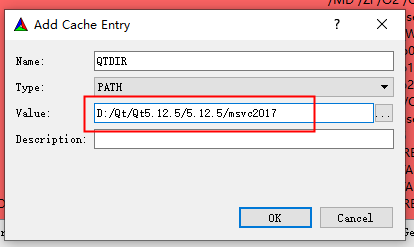
- 設定 QTDIR,指定 Qt 路徑。(如:C:\Qt\5.15.2\msvc2019_64)
CMake Bash
mkdir build
cd build

# 以下指令请根据平台选择执行
# Demo工程使用了QT库, 须指定QTDIR
# build in Windows
cmake .. -G "Visual Studio 17 2022" -A x64 -DQTDIR=C:/Qt/5.15.2/msvc2019_64

# build in Macos
cmake -S .. -B . -G "Xcode" -D CMAKE_OSX_DEPLOYMENT_TARGET:STRING=10.15 -DQTDIR:PATH=/Users/polyv/Qt/5.15.2/clang_64
C# Demo 使用 Visual Studio 開啟
- C# Demo 只支援 Windows。
- 推薦使用 Visual Studio 2022 開發。
- test/C# 直接開啟 polyv-player-demo-csharp.sln。
