


單一登入後台
描述
单点登录可以实现在登录已有系统的状态下,免登录操作进入保利威的账号、保利威的直播子账号、频道、助教,做直播相关设置
適用場景
保利威後台單一登入分為:帳號、直播子帳號、頻道、助教四種,其中帳號和子帳號的對接方式一致。
帳號:進入帳號後台,取得最高的管理員權限,管理所有頻道、子頻道,適合機構管理員的登入跳轉
直播子帳號:進入帳號後台,根據後台設定的對應帳號角色權限,擁有不同操作後台功能權限,適合機構不同角色員工的登入跳轉
頻道:進入頻道後台,僅取得目前頻道的管理員權限,可管理目前頻道及頻道下的子頻道,適合講師的登入跳轉
助教:僅可進入助教頁面,協助講師在直播中管理聊天室、發起互動功能等,適合助教、助理的登入跳轉
嘉賓:僅可進入嘉賓連麥頁面,協助講師解答問題、完成直播等
講師:僅可進入直播頁面,直接進入直播介面開始直播、發起互動功能等,適合講師、主持人的登入跳轉
溫馨提示
1、區分新版後台、舊版後台請點這裡。
2、單一登入後跳轉的位址 redirect 參數區分新版後台和舊版後台,請依照實際情況跳轉。
3、新版直播後台預設域名為 https://console.polyv.net ,舊版直播後台預設域名為 https://live.polyv.net ,如果您做了 CNAME 客製化,可以將 redirect 參數中的預設域名替換為 CNAME 設定的域名。
4、單一登入線上 demo 存取請點這裡。
流程圖
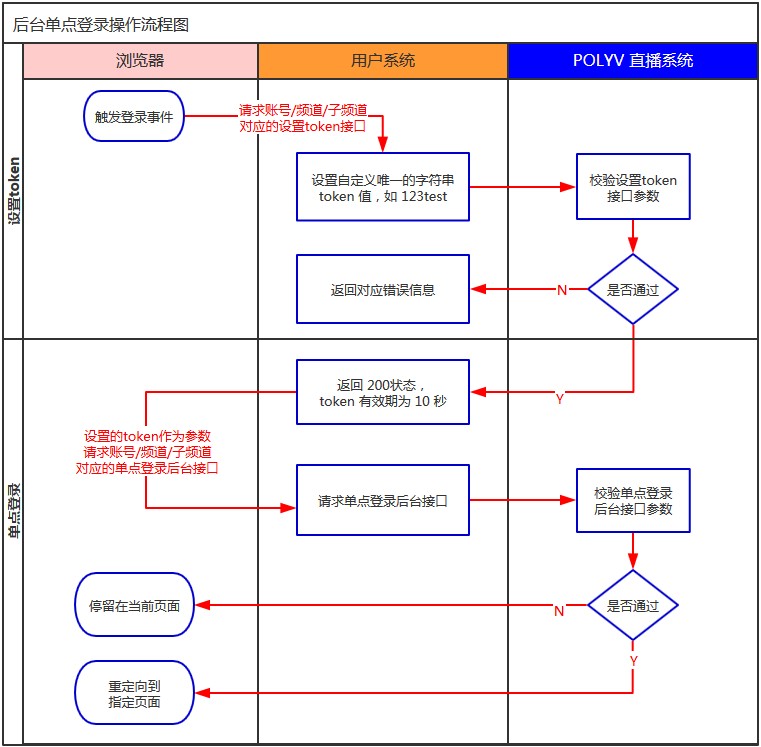
帳號單一登入
1、設定單一登入 token
2、帳號授權登入
帳號級授權位址為 https://console.polyv.net/v2/sso/userLogin.do ,拼接後的位址為 https://console.polyv.net/v2/sso/userLogin.do?userId={userId}&token={token}&redirect={redirect} ,您在瀏覽器中開啟授權位址即可,請求參數說明如下:
參數說明
| 參數名 | 必選 | 類型 | 說明 |
|---|---|---|---|
| userId | true | String | 帳號 id |
| token | true | String | 第一步設定的 token 值,10 秒內且一次驗證有效 |
| redirect | false | String | 完成授權後重新導向位址,使用 url 編碼,取值可參照【帳號級 redirect 取值】 預設為直播列表頁 |
帳號級 redirect 取值(url 編碼前)
| 版本 | 取值 | 說明 |
|---|---|---|
| 新版後台 | https://console.polyv.net/live/index.html#/channel | 直播列表頁,支援參數 hideTop、hideLeft 隱藏頂部和左側選單項目,如:https://console.polyv.net/live/index.html#/channel?hideTop=true&hideLeft=true |
| 舊版後台 | https://live.polyv.net/#/channel | 直播列表頁 |
| 舊版後台 | https://live.polyv.net/#/develop/appId | 直播後台開發設定 |
請求範例
https://console.polyv.net/v2/sso/userLogin.do?userId=1b448be323&token=yourToken&redirect=https%3A%2F%2Fconsole.polyv.net%2Flive%2Findex.html
Java 請求範例
快速接入基礎程式碼請下載相關依賴原始碼, 點擊下載原始碼 ,下載後加入到自己的原始碼工程中即可。測試案例中的 HttpUtil.java 和 LiveSignUtil.java 都包含在下載檔案中。
    //账号单点登录
    @Test
    public void testAccountSSO() throws IOException, NoSuchAlgorithmException {
        //公共参数,填写自己的实际参数
        String appId = super.appId;
        String appSecret = super.appSecret;
        String userId = super.userId;
        String timestamp = String.valueOf(System.currentTimeMillis());
        //自定义的token,只能使用一次,且10秒内有效
        String token = UUID.randomUUID().toString().replaceAll("-", "");
        String url = "https://api.polyv.net/live/v3/user/set-sso-token";

        //1、设置频道单点登录token
        Map<String, String> requestMap = new HashMap<>();
        requestMap.put("appId", appId);
        requestMap.put("timestamp", timestamp);
        requestMap.put("token", token);
        requestMap.put("sign", LiveSignUtil.getSign(requestMap, appSecret));
        String response = HttpUtil.postFormBody(url, requestMap);
        //TODO 判断response返回是否成功

        //2、生成账号授权登录地址
        String redirectUrl = "https://console.polyv.net/live/index.html";
        String authURL = "https://console.polyv.net/v2/sso/userLogin.do";
        authURL +=
        "?userId=" + userId + "&token=" + token + "&redirect=" + URLEncoder.encode(redirectUrl, "utf-8");
        log.info("账号单点登录设置成功,跳转地址为:{}", authURL);
    }
子帳號單一登入
1、設定單一登入 token
設定子帳號單一登入 token 其中請求參數 childEmail 為子帳號信箱,如:wcc@polyv.net
2、子帳號授權登入
子帳號級授權位址為 https://console.polyv.net/v2/sso/userLogin.do ,拼接後的位址為 https://console.polyv.net/v2/sso/userLogin.do?userId={userId}&token={token}&redirect={redirect}&childEmail={childEmail} ,您在瀏覽器中開啟授權位址即可,請求參數說明如下:
參數說明
| 參數名 | 必選 | 類型 | 說明 |
|---|---|---|---|
| userId | true | String | 帳號 id |
| token | true | String | 第一步設定的 token 值,10 秒內且一次驗證有效 |
| childEmail | true | String | 直播子帳號的信箱帳號 |
| redirect | false | String | 完成授權後重新導向位址,使用 url 編碼,取值可參照【子帳號級 redirect 取值】 預設為直播列表頁 |
子帳號級 redirect 取值(url 編碼前)
| 版本 | 取值 | 說明 |
|---|---|---|
| 新版後台 | https://console.polyv.net/live/index.html | 直播列表頁 |
| 舊版後台 | https://live.polyv.net/#/channel | 直播列表頁 |
| 舊版後台 | https://live.polyv.net/#/develop/appId | 直播後台開發設定 |
請求範例
https://console.polyv.net/v2/sso/userLogin.do?userId=1b448be323&token=yourToken&redirect=https%3A%2F%2Fconsole.polyv.net%2Flive%2Findex.html&childEmail=wcc@polyv.net
Java 請求範例
快速接入基礎程式碼請下載相關依賴原始碼, 點擊下載原始碼 ,下載後加入到自己的原始碼工程中即可。測試案例中的 HttpUtil.java 和 LiveSignUtil.java 都包含在下載檔案中。
    //子账号单点登录
    @Test
    public void testChildAccountSSO() throws IOException, NoSuchAlgorithmException {
        //公共参数,填写自己的实际参数
        String appId = super.appId;
        String appSecret = super.appSecret;
        String userId = super.userId;
        String timestamp = String.valueOf(System.currentTimeMillis());
        //自定义的token,只能使用一次,且10秒内有效
        String token = UUID.randomUUID().toString().replaceAll("-", "");
        String url = "https://api.polyv.net/live/v3/user/set-sso-token";
        //子账号邮箱
        String childEmail = "wzk@polyv.net";

        //1、设置频道单点登录token
        Map<String, String> requestMap = new HashMap<>();
        requestMap.put("appId", appId);
        requestMap.put("timestamp", timestamp);
        requestMap.put("token", token);
        requestMap.put("childEmail", childEmail);
        requestMap.put("sign", LiveSignUtil.getSign(requestMap, appSecret));
        String response = HttpUtil.postFormBody(url, requestMap);
        //TODO 判断response返回是否成功

        //2、生成子账号授权登录地址
        String redirectUrl = "https://console.polyv.net/live/index.html";
        String authURL = "https://console.polyv.net/v2/sso/userLogin.do";
        authURL += "?userId=" + userId + "&childEmail=" + childEmail + "&token=" + token + "&redirect=" +
        URLEncoder.encode(redirectUrl, "utf-8");
        log.info("子账号单点登录设置成功,跳转地址为:{}", authURL);
    }
頻道單一登入
1、設定單一登入 token
2、頻道授權登入
頻道級授權位址為 https://console.polyv.net/teacher/auth-login ,拼接後的位址為 https://console.polyv.net/teacher/auth-login?channelId={channelId}&token={token}&redirect={redirect} ,您在瀏覽器中開啟授權位址即可,請求參數說明如下:
參數說明
| 參數名 | 必選 | 類型 | 說明 |
|---|---|---|---|
| channelId | true | String | 頻道號 |
| token | true | String | 第一步設定的 token 值,10 秒內且一次驗證有效 |
| redirect | false | String | 完成授權後重新導向位址,使用 url 編碼,取值可參照【頻道級 redirect 取值】 預設為直播間資訊頁 |
| failRedirect | false | String | 授權失敗後重新導向位址,使用 url 編碼。 |
頻道級 redirect 取值(url 編碼前)
| 版本 | 取值 | 說明 |
|---|---|---|
| 新版後台 | https://console.polyv.net/live/#/teacher/{channelId}/base-info/channel-info | 直播間資訊頁,其中 {channelId} 需替換為對應頻道號 |
| 新版後台 | https://console.polyv.net/live/#/teacher/{channelId}/channel-statistics | 直播間統計頁,其中 {channelId} 需替換為對應頻道號 |
| 舊版後台 | https://live.polyv.net/#/teacher/{channelId}/monitoring | 直播間監控頁,其中 {channelId} 需替換為對應頻道號 |
| 舊版後台 | https://live.polyv.net/#/teacher/{channelId}/room/detail | 直播間資訊頁,其中 {channelId} 需替換為對應頻道號 |
| 舊版後台 | https://live.polyv.net/#/teacher/{channelId}/statistic | 直播間統計頁,其中 {channelId} 需替換為對應頻道號 |
請求範例
https://console.polyv.net/teacher/auth-login?channelId=1965681&token=yourToken&redirect=https%3A%2F%2Fconsole.polyv.net%2Flive%2F%23%2Fteacher%2F1965681%2Fbase-info%2Fchannel-info
Java 請求範例
快速接入基礎程式碼請下載相關依賴原始碼, 點擊下載原始碼 ,下載後加入到自己的原始碼工程中即可。測試案例中的 HttpUtil.java 和 LiveSignUtil.java 都包含在下載檔案中。
    //频道单点登录
    @Test
    public void testChannelSSO() throws IOException, NoSuchAlgorithmException {
        //公共参数,填写自己的实际参数
        String appId = super.appId;
        String appSecret = super.appSecret;
        String userId = super.userId;
        String timestamp = String.valueOf(System.currentTimeMillis());
        //自定义的token,只能使用一次,且10秒内有效
        String token = UUID.randomUUID().toString().replaceAll("-", "");
        //频道号
        String channelId = "1965681";
        String url = String.format("http://api.polyv.net/live/v2/channels/%s/set-token", channelId);

        //1、设置频道单点登录token
        Map<String, String> requestMap = new HashMap<>();
        requestMap.put("appId", appId);
        requestMap.put("timestamp", timestamp);
        requestMap.put("token", token);
        requestMap.put("sign", LiveSignUtil.getSign(requestMap, appSecret));
        String response = HttpUtil.postFormBody(url, requestMap);
        //TODO 判断response返回是否成功

        //2、生成频道授权登录地址
        String redirectUrl = String.format("https://console.polyv.net/live/#/teacher/%s/base-info/channel-info",
        channelId);
        String authURL = "https://console.polyv.net/teacher/auth-login";
        authURL +=
        "?channelId=" + channelId + "&token=" + token + "&redirect=" + URLEncoder.encode(redirectUrl, "utf-8");
        log.info("频道单点登录设置成功,跳转地址为:{}", authURL);
    }
助教單一登入
1、設定單一登入 token
設定子頻道單一登入 token 其中請求參數 accountId 為助教帳號 id,如:0041965681
2、助教授權登入
助教級授權位址為 https://console.polyv.net/teacher/auth-login ,拼接後的位址為 https://console.polyv.net/teacher/auth-login?channelId={channelId}&token={token}&redirect={redirect} ,您在瀏覽器中開啟授權位址即可,請求參數說明如下:
參數說明
| 參數名 | 必選 | 類型 | 說明 |
|---|---|---|---|
| channelId | true | String | 助教帳號,如:0041965681,不能去除前面的 00 |
| token | true | String | 第一步設定的 token 值,10 秒內且一次驗證有效 |
| redirect | false | String | 完成授權後重新導向位址,使用 url 編碼,取值可參照【助教級 redirect 取值】 預設為舊版助教頁 |
| failRedirect | false | String | 授權失敗後重新導向位址,使用 url 編碼。 |
助教級 redirect 取值(url 編碼前)
| 版本 | 取值 | 說明 |
|---|---|---|
| 新版後台 | https://console.polyv.net/assistant/?accountId={channelId} | 新版助教頁,其中 {channelId} 需替換為對應助教帳號,如:0041965681 |
| 舊版後台 | https://live.polyv.net/assistant.html | 舊版助教頁,如果開通新版助教頁,則會自動跳轉至新版 |
請求範例
https://console.polyv.net/teacher/auth-login?channelId=0041965681&token=yourToken&redirect=https%3A%2F%2Fconsole.polyv.net%2Fassistant%2F%3FaccountId%3D0041965681
Java 請求範例
快速接入基礎程式碼請下載相關依賴原始碼, 點擊下載原始碼 ,下載後加入到自己的原始碼工程中即可。測試案例中的 HttpUtil.java 和 LiveSignUtil.java 都包含在下載檔案中。
    //助教单点登录
    @Test
    public void testAssistantSSO() throws IOException, NoSuchAlgorithmException {
        //公共参数,填写自己的实际参数
        String appId = super.appId;
        String appSecret = super.appSecret;
        String userId = super.userId;
        String timestamp = String.valueOf(System.currentTimeMillis());
        //自定义的token,只能使用一次,且10秒内有效
        String token = UUID.randomUUID().toString().replaceAll("-", "");
        //助教账号
        String accountId = "0041965681";
        String url = String.format("http://api.polyv.net/live/v2/channels/%s/set-account-token", accountId);

        //1、设置助教单点登录token
        Map<String, String> requestMap = new HashMap<>();
        requestMap.put("appId", appId);
        requestMap.put("timestamp", timestamp);
        requestMap.put("token", token);
        requestMap.put("sign", LiveSignUtil.getSign(requestMap, appSecret));
        String response = HttpUtil.postFormBody(url, requestMap);
        //TODO 判断response返回是否成功

        //2、生成助教授权登录地址
        String redirectUrl = "https://console.polyv.net/assistant/?accountId=" + accountId;
        String authURL = "https://console.polyv.net/teacher/auth-login";
        authURL +=
        "?channelId=" + accountId + "&token=" + token + "&redirect=" + URLEncoder.encode(redirectUrl, "utf-8");
        log.info("助教单点登录设置成功,跳转地址为:{}", authURL);
    }
嘉賓單一登入
1、設定單一登入 token
設定子頻道單一登入 token 其中請求參數 accountId 為嘉賓帳號 id,如:0021965681
2、嘉賓授權登入
嘉賓級授權位址為 https://console.polyv.net/teacher/auth-login ,拼接後的位址為 https://console.polyv.net/teacher/auth-login?channelId={channelId}&token={token}&redirect={redirect} ,您在瀏覽器中開啟授權位址即可,請求參數說明如下:
參數說明
| 參數名 | 必選 | 類型 | 說明 |
|---|---|---|---|
| channelId | true | String | 嘉賓帳號,如:0021965681,不能去除前面的 00 |
| token | true | String | 第一步設定的 token 值,10 秒內且一次驗證有效 |
| redirect | true | String | 完成授權後重新導向位址,使用 url 編碼,取值可參照【嘉賓級 redirect 取值】 |
| failRedirect | false | String | 授權失敗後重新導向位址,使用 url 編碼。 |
嘉賓級 redirect 取值(url 編碼前)
| 取值 | 說明 |
|---|---|
| https://console.polyv.net/web-start/?channelId={channelId} | 嘉賓頁,其中 {channelId} 需替換為對應嘉賓帳號,如:0021965681 |
請求範例
https://console.polyv.net/teacher/auth-login?channelId=0021965681&token=yourToken&redirect=https%3A%2F%2Fconsole.polyv.net%2Fweb-start%2F%3FchannelId%3D0021965681
Java 請求範例
快速接入基礎程式碼請下載相關依賴原始碼, 點擊下載原始碼 ,下載後加入到自己的原始碼工程中即可。測試案例中的 HttpUtil.java 和 LiveSignUtil.java 都包含在下載檔案中。
    //嘉宾单点登录
    @Test
    public void testGuestSSO() throws IOException, NoSuchAlgorithmException {
        //公共参数,填写自己的实际参数
        String appId = super.appId;
        String appSecret = super.appSecret;
        String userId = super.userId;
        String timestamp = String.valueOf(System.currentTimeMillis());
        //自定义的token,只能使用一次,且10秒内有效
        String token = UUID.randomUUID().toString().replaceAll("-", "");
        //嘉宾账号
        String accountId = "0021965681";
        String url = String.format("http://api.polyv.net/live/v2/channels/%s/set-account-token", accountId);

        //1、设置嘉宾单点登录token
        Map<String, String> requestMap = new HashMap<>();
        requestMap.put("appId", appId);
        requestMap.put("timestamp", timestamp);
        requestMap.put("token", token);
        requestMap.put("sign", LiveSignUtil.getSign(requestMap, appSecret));
        String response = HttpUtil.postFormBody(url, requestMap);
        //TODO 判断response返回是否成功

        //2、生成嘉宾授权登录地址
        String redirectUrl = "https://console.polyv.net/web-start/?channelId=" + accountId;
        String authURL = "https://console.polyv.net/teacher/auth-login";
        authURL +=
        "?channelId=" + accountId + "&token=" + token + "&redirect=" + URLEncoder.encode(redirectUrl, "utf-8");
        log.info("嘉宾单点登录设置成功,跳转地址为:{}", authURL);
    }
講師單一登入
1、設定單一登入 token
2、講師授權登入
講師級授權位址為 https://console.polyv.net/teacher/auth-login ,拼接後的位址為 https://console.polyv.net/teacher/auth-login?channelId={channelId}&token={token}&redirect={redirect} ,您在瀏覽器中開啟授權位址即可,請求參數說明如下:
參數說明
| 參數名 | 必選 | 類型 | 說明 |
|---|---|---|---|
| channelId | true | String | 頻道號,如:1965681 |
| token | true | String | 第一步設定的 token 值,10 秒內且一次驗證有效 |
| redirect | true | String | 完成授權後重新導向位址,使用 url 編碼,取值可參照【講師級 redirect 取值】 |
| failRedirect | false | String | 授權失敗後重新導向位址,使用 url 編碼。【註:如果登入時頻道已有講師在開播,也會觸發授權失敗重新導向】 |
講師級 redirect 取值(url 編碼前)
| 取值 | 說明 |
|---|---|
| https://console.polyv.net/web-start/?channelId={channelId} | 講師開播頁,其中 {channelId} 需替換為對應頻道號,如:1965681 |
請求範例
https://console.polyv.net/teacher/auth-login?channelId=1965681&token=yourToken&redirect=https%3A%2F%2Fconsole.polyv.net%2Fweb-start%2F%3FchannelId%3D1965681
Java 請求範例
快速接入基礎程式碼請下載相關依賴原始碼, 點擊下載原始碼 ,下載後加入到自己的原始碼工程中即可。測試案例中的 HttpUtil.java 和 LiveSignUtil.java 都包含在下載檔案中。
    @Test
    public void testTeacherSSO() throws IOException, NoSuchAlgorithmException {
        //公共参数,填写自己的实际参数
        String appId = super.appId;
        String appSecret = super.appSecret;
        String timestamp = String.valueOf(System.currentTimeMillis());
        //频道号
        String channelId = "1965681";
        //自定义的token,只能使用一次,且10秒内有效
        String token = UUID.randomUUID().toString().replaceAll("-", "");
        String url = String.format("http://api.polyv.net/live/v2/channels/%s/set-token", channelId);

        //1、设置频道单点登录token
        Map<String, String> requestMap = new HashMap<>();
        requestMap.put("appId", appId);
        requestMap.put("timestamp", timestamp);
        requestMap.put("token", token);
        requestMap.put("sign", LiveSignUtil.getSign(requestMap, appSecret));
        String response = HttpUtil.postFormBody(url, requestMap);
        //TODO 判断response返回是否成功

        //2、生成讲师授权登录地址
        String redirectUrl = "https://console.polyv.net/web-start/?channelId=" + channelId;
        String authURL = "https://console.polyv.net/teacher/auth-login";
        authURL +=
        "?channelId=" + channelId + "&token=" + token + "&redirect=" + URLEncoder.encode(redirectUrl, "utf-8");
        log.info("讲师单点登录地址设置成功,跳转地址为:{}", authURL);
    }
MR 控制台單一登入
1、設定單一登入 token
2、MR 控制台授權登入
授權位址為 https://console.polyv.net/teacher/mr-auth-login ,拼接後的位址為 https://console.polyv.net/teacher/mr-auth-login?channelId={channelId}&token={token}&mrLiveLoginType={mrLiveLoginType}&redirect={redirect} ,您在瀏覽器中開啟授權位址即可,請求參數說明如下:
參數說明
| 參數名 | 必選 | 類型 | 說明 |
|---|---|---|---|
| channelId | true | String | 頻道號,如:3265597 |
| token | true | String | 第一步設定的 token 值,10 秒內且一次驗證有效 |
| redirect | true | String | 完成授權後重新導向位址,使用 url 編碼,取值可參照【MR 控制台 redirect 取值】 |
| mrLiveLoginType | false | String | 登入模式 cloud:雲端模式 client:本地模式 不傳值時,若使用者只有一種模式權限,則使用既有模式,若使用者擁有兩種模式權限,預設使用【雲端模式】 |
MR 控制台 redirect 取值(url 編碼前)
| 取值 | 說明 |
|---|---|
| https://live.polyv.net/mr-controller/scene?channelId={channelId} | MR 控制台頁,其中 {channelId} 需替換為對應 MR 頻道號,如:3265597 |
請求範例
__PLV
